
 Lessons: 12Length: 1.9 hours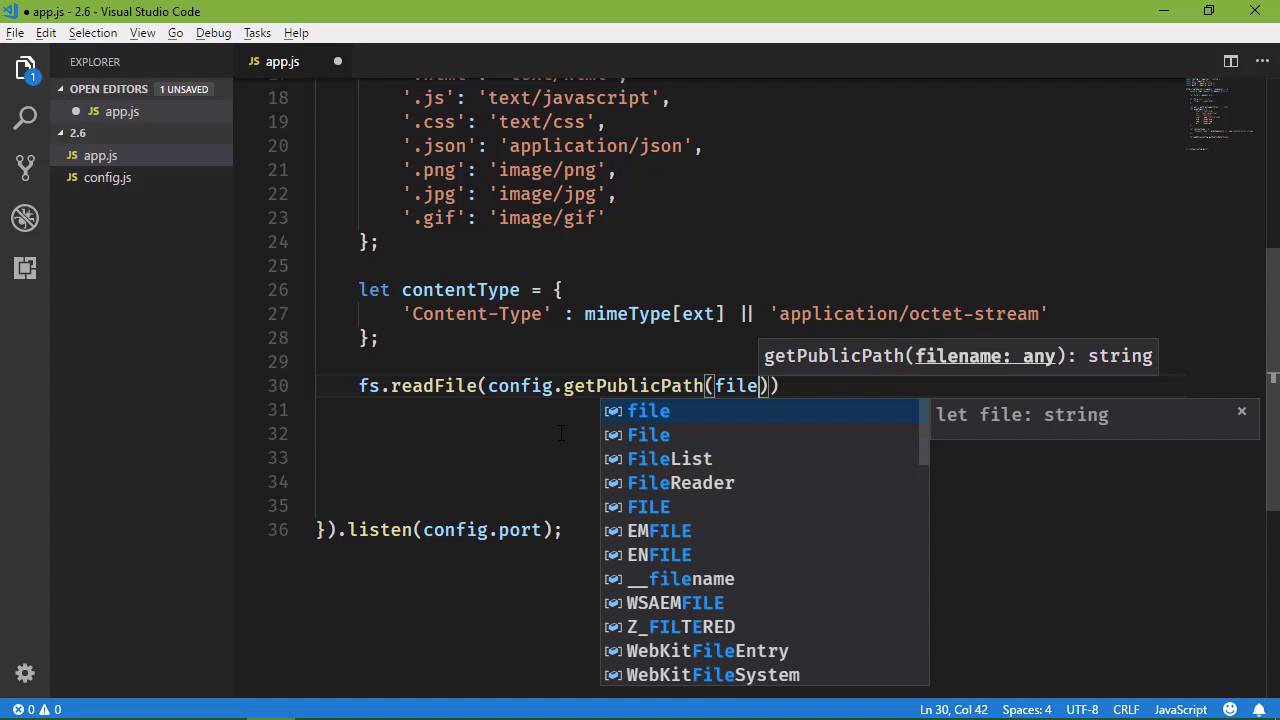
- Overview
- Transcript
2.6 Writing an HTTP Server
Next, we'll combine everything we've talked about in this chapter to write a configurable HTTP server. Let's get cracking!
1.Introduction
1.1Introduction01:50
1.2Getting Set Up07:33
2.Node.js Concepts
2.1The Event Loop and Async Programming10:29
2.2The Asynchronous Pattern12:06
2.3Using Readable Streams11:18
2.4Writing Is Just as Important09:57
2.5Writing Modules (and Other Stuff)14:57
2.6Writing an HTTP Server16:21
3.Tools for Node.js Developers
3.1The `util` Module11:18
3.2NPM11:23
3.3Creating a package.json File06:54
4.Conclusion
4.1Conclusion01:13
2.6 Writing an HTTP Server
In this lesson, we are going to write an http server. Now, I know that that sounds daunting, and I'm not going to say that it is simple. However, it is not as difficult as it sounds. In fact, it's rather straightforward because all of the hard work is done for us. All we need to do is just handle the requests. So let's get started, we will create our folder, 2.6. And I'm going to cheat a little bit and paste some code in. We are going to use a config module, kind of like what we wrote in the previous lesson. But there are some changes, so let me create that file and paste in the code and we can go over what those changes are. So basically the settings are for an http server. We have a port and then we have a public folder that's where all of the Files are going to reside that will be actually served to the client, so Html, images, Java Script, CSS, things like that. Anything that is publicly available will be in this public folder. So, those are the pieces of information that we want to keep track of. But when it comes to loading the config file, we have the ability to not supply one, because we have some default values. So, the user just wants to fire up the application without specifying any type of config file, then great. If they want to supply one, then great. It doesn't matter. So, if there is no file name It simply returns and we use the default values. Otherwise, we read the file, we parse the JSON and then we set our port and public folders. And then we have the getters that are available. Now there is this get public path. We will need to get the files that are inside of the public folder. So for the lack of any other place to put this method, I decided to put it here in the config. So that we can supply just a file name and then get the full path to that file name. So that we don't have to keep using the path.join method, which I'm glad I caught that because that would have been an issue. So instead of having to write this a lot we just have a helper method to do that so with that out of the way, let's create our application file. I'm going to call it at.js and let's bring in our config so we will require and remember we need to specify the path to our config module there. We also need the file system, so we will grab that. And I'm not sure if we're going to need path. Since we have the ability to use the config module for getting our files, we might not need the path. If we end up needing it, we'll bring it in, but we're going to need another package and it is called http. This is where all of the magic is done as far as the HTTP stuff, because this will allow us to create and HTTP server and then we can Serve files, basically. So for right now let's not worry about getting the config and loading it and all of that stuff, because we do have settings that we can work with. And then we can come back and add in that functionality. So in order to create an HTTP server, we'll use our http object, and it has a method called createServer. And it has a callback. The first argument is going to be the request that's coming in the second argument is the response that we are going to write to. So these are essentially input and output. Let's name that response. Not reponse which I keep doing. There we go. So we have our created server and we could run this although we would need to call the listen method. And here we can say config and then port. And that will get our port there. Okay, so let's do this. Whenever we receive a request, lets go ahead and write that request to the console so that we can see that hey, we got a request and this is what we did. So we have a request for whatever we have for this URL property on the request. So this request object has everything about the request. That our server is receiving so we can get the URL there. And with that URL we can know what file it is that we want to retrieve from our file system. So, let's say let file = and once again we will use our request object's url property. Now, this url property is going to return everything after the host and the port. So, it's going to include the slash. And then whatever path is after that so if we just make a request for the root of our website then the only thing that the URL property is going to contain is the slash. If we have an about.html file that is the data that we're going to have. Now, we do need to have this idea of a default document. If there is no document specified, then we need to go ahead and assume that that is the index page. So if file Is equal to just a slash then we're going to change file to be equal /index.html. So we have our default document. And then, the next thing we need to do is determine what type of file that we have. Because it's not enough to just return the content of whatever was requested. We also need to supply the MIME type or the content type. So we get that from the extension of the file. So we do need path, so let's go ahead and bring that in so that we have it. We've only used path to build a full path with individual segments. Right now, we're going to use path to get the extension of whatever we pass to it. So let's say ext equals It will say path and we have a method called ext name, stands for extension name. We pass in the file and this is going to give us the extension of that file. Now it does include the dot. There are some platforms that do not, this does. So we have the dot, and then the extension. And we will use that to look up the MIME type. So I'm going to paste in this code because if I try to type this, it's going to be difficult. But basically we have an object where well, it serving as a hash table basically where the key is the extension and then the MIME type is the value. So basically, we are going to do this. We'll say let contentType =, and let's set this as an object. Because you will see why here in a few moments. So we're going to have an object that's going to have a property called Content-Type. And we'll set that equal to mimeTypes, and we will pass in Our ext. Now it's possible that a request is made for something that is not in our table of supported mimeTypes. In which case we need to use the default, good old application/octet-stream, and there we go. So we have our contentType. Now we just need to actually serve the content. So we will have our FS object because we want to read the requested file. We will say, config and then getPublicPath. And then we will pass in the file name there. So that's going to build the full path to the file that we want to load. And then we have our callback, so we have our error, we also have the content of the file that we want to read. Now let's handle the error first If we have an error, then one of two things is the problem. Either the file could not be found, or there was some other problem. Now if a file is not found, we are going to get an error code of ENOENT. Now the reason why that means that a file can't be found is because it stands for error no entry, or error no entity, it really depends upon who you ask as to what that means. So that's why this means that there is no file. So what we want to do is check to see if our error code is equal to ENOENT. And if it is then we want to handle 404. Now one thing that we could do is have our own 404 that we would then display. And so to do that we need to read another file. And we would put that 404 inside of the public folder. So we would use our config, getPublicPath and then we would pass in 404.html and then we would write our callback. So we would have error and then content. Now I'm going to do something which might seem a little wrong in this case. We're going to write to the response. We are going to write a header with the right head method. Now we need to pass in the status code, so I'm going to do 200. Now I know that this is a 404, but I have gone through the whole security consulting thing for websites. And one thing that I've been told repeatedly is for a website, just return to 100, for everything. It doesn't matter, because if somebody is going to target your website they aren't going to do it manually. They are going to use a program. It's going to crawl, everything. It's also going to try to look for any known exploits. So, for anything that's not found, for any server errors, for just everything and all, return a 200. That way the program doesn't know that something does exist, or something doesn't exist. It doesn't know what caused an error so that they could try to find an attack vector. If everything returns 200 then they're kind of at a loss. Unless if they come to the website and manually do those things, but nobody is going to spend the time to do that. So just return 200. If it's a RESTFUL API then yeah, you want to do all of the correct status return types and all of that stuff, for website nope. Okay so we are going to return a status of 200. Then we will have our content type. So this is why I wanted to just go ahead and create an object that has a content type property. Because we have to pass an object tier that has all of the header that we want to set. So, if we wanted to set more than just a content type, then. Yeah, we would probably need some other solution here. But in this case, this is going to be fine. Because we're going to do this same exact thing for whenever we have everything's okay and we actually return the requested file. So after we write the header, then we are going to end the response with writing the contents of our 404 to the response and we need to set encoding to utf-8, and we're done as far as that situation is concerned. If there is some other error, like a server error, like our application just dies for whatever reason, we are going to return just the 500. Now we could include the error code whenever we write this message. We could say Sorry, something went wrong, Try again. Now, I just went through a whole spiel about returning 200s and all that stuff, but here this is okay. I want to show you how you can return different stuff. So just keep that in mind. Okay, so we're gonna say error code and then we will include the error.code, there we go. So we have the error stuff all taken care of, now we just need to actually return the file that was requested. So if everything is okay, then I'm going to copy and past the code from up here for the 404 because it's the same thing. We are writing a 200, we are setting the content type then we are writing the content to the response and we're done. So the last thing I want to do is have a message. We'll just say console.log, and then we will say, Server running at http://localhost. And then we will use our port from the config. And we're good to go there. So now we just need content. So let's create a new folder called public. We need a new file called index.html I don't care what the content is, this is index. We don't need markup we're just checking to see if this stuff works. We have content, we have our code. Let's see what's this is actually going to do. So let's call our application. We see the server is running so let's fire up Chrome. And let's see what we get when we go to localhost:8080, I believe is the port that I used. And something didn't go right. Let's look at the console. mimeType is not defined. Yeah, it is, but I probably typed it wrong. So we have mimeTypes and that is mimeType. Okay, one keystroke can just ruin the world. Okay, so let's try it again. Let's go and refresh the page, this is Index. Hey, that is something to see. So let's try 'about.html', this is about I like it. Let's try the 404 'asdf.html'. So far, so good. Let's go up to content, and sorry, something went wrong. Try again. Well, from what I read, it means that there is a directory, but the expected file type is something other than a directory. Let's look at and I see what the problem is right there. Our check was just for a slash, where, really, what we need to do is also check to see if it ends with a slash. So let's do this, let's go back and let's say that if the file ends with / then what we'll do then is take the file. We will += slash if it didn't do a slash we don't need slash there and then index.html that should fix that. So let's stop this and run it again. I hate doing this, but since we made that change, we do need to make sure everything else works. We get index, great. Let's go to about html that look great. Let's go to something that doesn't exist that looks great. So let's go to content, and then we have index of content. And so, we are good to go then we have our http server that will serve a multitude of different types of files.





