
 Lessons: 12Length: 1.9 hours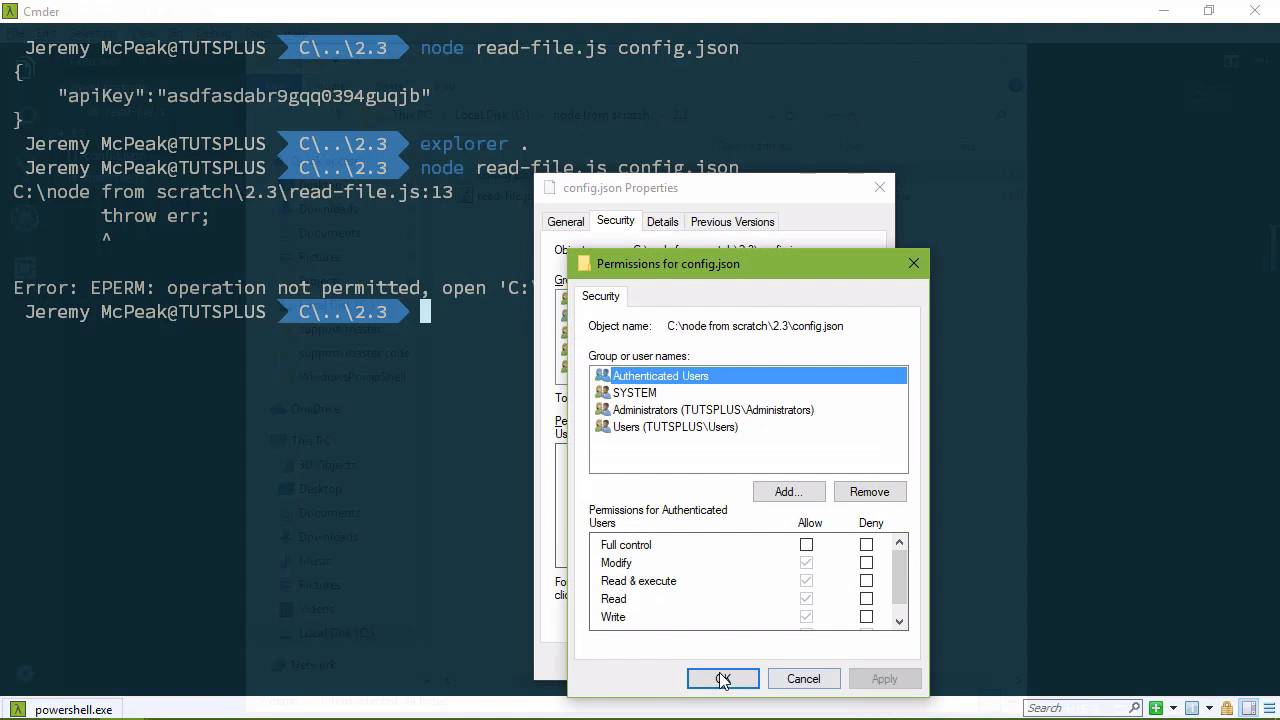
- Overview
- Transcript
2.3 Using Readable Streams
You will work with streams in just about every application you write. In this lesson, we'll look at a special stream called a ReadableStream. Using this class, I'll also show you how to pull information from the command line.
1.Introduction
1.1Introduction01:50
1.2Getting Set Up07:33
2.Node.js Concepts
2.1The Event Loop and Async Programming10:29
2.2The Asynchronous Pattern12:06
2.3Using Readable Streams11:18
2.4Writing Is Just as Important09:57
2.5Writing Modules (and Other Stuff)14:57
2.6Writing an HTTP Server16:21
3.Tools for Node.js Developers
3.1The `util` Module11:18
3.2NPM11:23
3.3Creating a package.json File06:54
4.Conclusion
4.1Conclusion01:13
2.3 Using Readable Streams
We're going to pick up kind of where we left off in the previous lesson, and continue talking about streams. Because streams are a very important part of our applications, in most of our applications we're going to be working with streams. Even if we don't directly work with them, they will be used behind the scenes. That's just how it is. So in this lesson, what we're going to do is talk about opening and reading files, because that is a useful thing to know. It's also going to give you more exposure to working with strings. So let's start by creating our 2.3 folder, and what we'll do is have an application that will open up a config file. That makes sense because many applications needs a config file, and we would do so through the command line. So we would say node. And we can call this read-file.js. And then we would have our config file. So not only are we going to look at opening and reading files, but also how to get values from the command that was executed. So let's start by creating our config file. And let's assume that this application is going to be working with a web API that requires us to have an API key to access its resources. So it doesn't matter what the value is here just as long as we have something. And then we will have our application file. So that was read-file.js. Let's, of course, use strict. And since we are going to be working with the file system, it makes sense to go ahead and require the fs module. So let's, first of all, talk about how we get the value of config.json from the command that we execute. Now, in the previous lesson, we used the process object. So we're going to use that again. It has a property called argv. This is an array and the elements in this array are the items in the command that we executed. So if we try to get the value at index 0, that's the first position, then we are going to get node here. Actually we're going to get a little bit more than that. We're going to get the path to that executable. So let's do this, let's go ahead and create a variable called config file. And then we will write that to the console. So configfile and there we go. So whenever we run this we are going to see the path to no.exe. If we change this to the index of 1, that is the second position in the array, that's also the second position in the command. So this would be our read file.js, as we can see there. So that means that index two is going to be config.json. So there we go, we have that value. Now this is an important thing to know, our application needs a config. So if it does not have a config, we are just going to go ahead and fail. So we will throw an error and it will say, Please provide a configuration file. So if we don't have a configFile, it fails, we're done. But if we do have a configFile, then we will want to read that, and we can read a file in several different ways. The first is going to be reading the entire file all at once. So this is useful for small files, which our config file is small, so we will use our fs.object. And we have a method, called readFile. The first argument that we pass is the file that we want to open. And then we have our call back, our trusty callback. We will always have callbacks. And notice that I have the error object as first. And then you have the parameter for working with whatever it is that we're working with. We're working with the data of a file, so I just called it data. And then we need to check to see if we have an error. Because if we do, then we can't do what we need to do. So we're going to throw that error that is going to halt our application, and we'll be done then. But if everything is okay, then we will just write that data to the console, and we'll be done. So there we go, let's run this, and we should see the contents of that file, we do. Now in the previous lesson, we didn't have a way of causing an error with the standard input. But now that we have a file on the file system, we can. We can deny access to it. So let's do that so that we can see that actually happen. So I'm going to change the permissions on this config file. And all I'm going to do is Add everyone, which you typically don't want to do unless, if you actually want everyone, including unauthenticated users to access that file. But, in this case, we are adding deny permissions. So there we have that. If we run this again, we're going to see that it will fail because nothing has Read access to that file. Our application cannot read it. So there we can see that error handling taking place. But for right now we don't want that functionality. So let's remove that restriction, but we're going to leave this up. Because we want to look at other ways of how we can handle that same type of error with some of our other approaches to reading a file, so this is the first way. It's useful for whenever you want to read a small file all at once, get all of its contents and boom, you're done. So the second way is getting a read stream. So once again we're going to use our FS object, and this has a method called create read stream. It also has a method called create write stream, which is something we will look at in the next lesson. Because it makes sense if you can read something you can also write it so in the next lesson, we will write files. So we want to read a file. So we will call this, createReadStream, and then we pass in the file that we want to read, our configFile. And then, from here, we can call a method Called pipe. And then we simply pass in the output stream. So this is very useful if you don't really care what the contents of a stream is, but you want to take a read stream and just pipe it into an output stream. And in this case, We will say process.stdout and we'll be done there. So if we look at this, then we are going to see the same results, we have the output there. So and the event that you just want to read something and immediately output that, using the pipe method is very useful. But if you want to use events, then we can do that as well. Doing so gives us a little bit more control over everything. So once again though, we're going to create a read stream, want to pass in our config file. Then we're going to call the on method. Let's put this on another line. So we're going to call the on method. Now, this is a read stream. A read stream is an event emitter. We talked about that in the previous lesson. We used the standard input in the previous lesson and that is a read stream as well. So we used the data event and we can use the data event here as well. So whenever we have data then we will execute our callback. Now, I'm going to do something a little bit different here. Instead of having the error as the first argument I'm going to get rid of that. Whoa, wait, wait, wait, wait, wait, it's okay, it's okay. We can handle that error in a different way, but let's finish this. Now we could come in here, we could say console.log(chunk), but let's do this, because this would be a good segue into the next less. And that is, we will us process.stdout And we have a method called write. So that for a write string, we have a method called Write so that we can write to that stream and in this case, we are just going to write the data that we have, our chunk. So we want to make sure that if an error does occur when attempting to read this file. That we handle that. So we can set up another event listener. And in this case, we're going to listen for the error event. So that's whenever the error event occurs, then our callback is going to execute. It will give us the error object that we need, and then we can just write this to the standard output as well. So we'll say standard outright. By the way whenever you call counsel.log it's actually using the standard output.right. Now there is some formatting being done there, but that's the magic behind the curtain right there. Okay, so in this case we're going to write a message, and really, it's going to be the error message. So we'll say error and then we will use our error objects message property and there we will go. So let's make sure I have enough parentheses, I do. And also notice that I chained these together. So each on method is going to return the read stream. So we've set up the data event listener. We've set up the error event listener. So whenever we hop on over to the command line and we run this, once again, we see the results that we got before. But let's go back, and let's deny access for everyone. Just that we can see the error event take place. So yes, okay, blabbity blah, and here we go. We will run our command once again we get an error, but notice here. We don't get the stack trace dump that we have gotten before, because we didn't output or we didn't throw that error. Instead, we just output the message. So all we see is the message: operation not permitted to open up that file. So that is several different ways that we can open and read files, and that is really that. The first way is to just open the file and read it all at once, with the read file method. The second way is to just pipe the contents of a stream into an output stream. And then the third is to use events to give you a little bit more control over everything. So in the next lesson we will pick up where we left off and we will write to our config file.





