
 Lessons: 12Length: 1.4 hours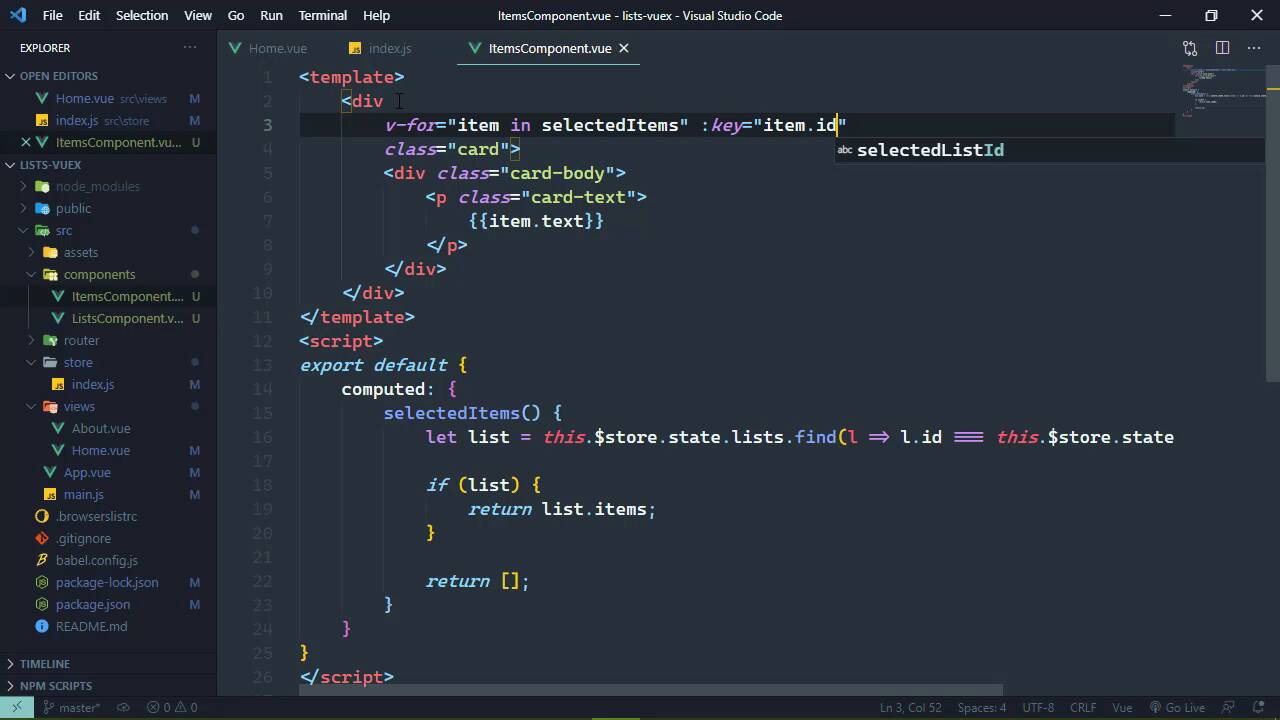
- Overview
- Transcript
2.5 Using Getters to Compute Values
Components have computed properties, and Vuex has identical functionality with getters. In this lesson, we'll use a getter to make it easy to display the items for the selected list.
1.Introduction
1.1Introduction01:25
2.Using Vuex
2.1Setting Up the Project05:54
2.2Displaying a List07:03
2.3Adding State04:57
2.4Committing and Tracking Changes09:03
2.5Using Getters to Compute Values08:44
2.6Dispatching Actions to Perform Asynchronous Work06:53
2.7Using Mapping Functions08:14
3.Advanced Vuex
3.1Using Vuex With the Composition API08:17
3.2Getter Methods09:04
3.3Don't Track Everything and Make Your Actions Chainable13:21
4.Conclusion
4.1Conclusion00:57
2.5 Using Getters to Compute Values
In the previous lesson, we started tracking the selected list in our Vuex store, and we modify our state using mutations. We commit those mutations instead of directly manipulating the state itself. That way, we can track the changes that are made to our store so that if we need to debug our application, then it makes it so much easier to do that. Now in this lesson, we are going to see the benefit of using our Vuex store to track the selected list. Because now we are going to load the items for the selected list. Now, we don't have any items yet, so let's go ahead and let's hard code some. These are very simple objects, they have an id. They also have a text property, and let's give some unique text for each item. So this one will be, this is the first item in the first list. And by having unique values, we can make sure that we are loading the correct items. Now, there's also a status property which is Boolean. So we will have one item that has a status of true, then we will have another item that has a status of false. But to be sure to change the id. Let's also change the text that This is the second item. So let's copy these two items, let's paste them into the second list. Now the ids need to continue on because they all share the same id generation code on the server. So we will have 4 items here with 4 unique ids, and then the text This is the first item in the second list. and we will make that same change for the second item. So now that we have our items, we just want to display them. And we are going to do so very similar to our lists component. So let's create another file inside of the components folder, we'll call it itemsComponent. And to display an item, we are going to use a bootstrap card. Now we can use different classes to have different looking cards. And we definitely want to do that so that we can visually see what has a status of true and what doesn't. So we will come back here and we will add in those specific classes based upon the status value. But for right now, we're just gonna stick with card. And a card has a body so let's go ahead and add that, and then most cards are going to have some text. So that has a card-text. And this is where we are going to display the item.text for now. Now of course, in order to display these cards, we need to iterate over the items of the selected list. So how do we do that? Well, we're going to start by creating a computed property. Let's first of all get rid of all of this stuff for the composition API, we'll be looking at that later. But let's call this computed property selectedItems. And we have all of the information that we need, because we have first of all our lists. We also have the id of the selected list. So the first thing we need to do is find that selected list. So we're going to access our data store with $store.state and then lists. This is an array so we can use the find method, and we want to find the list with the selected id. So this is gonna be a little verbose, but it's going to get us what we need. So we are going to our state, and then the selectedListiD. Now it's possible that we don't have a list. If we don't, then there's something very wrong there. So let's go ahead and just make sure to check to see if we have a list, and if we do then we will simply just return the items. Otherwise, we will return an empty array. So this gives us something to iterate over. So inside of our template for our div, that is our card, we will have v-for and we want for every item inside of selected items. And we will set the key to the item.id. So there we go, that should at least display the items for us. We of course need to use this component, so let's go to our Home.vue. Let's add in the items where we want them to be displayed. We of course also need to import that and tell our application that hey, we have these items here. So let's import that, and we will simply then add items to our components. So if we go to the browser and click on one of the selected lists, we can see that the items are being loaded. This is the first item for the first list. This is the second item for the first list. And of course, we see the items for the second list. Let's do add some margin here, so let's add it to the bottom. So mb-3, that looks good. All right, so great, we are displaying our list. However, I want to make this a little bit cleaner, at least as far as our component is concerned because, I just don't like that. So thankfully we can, because we essentially have computed properties directly inside of our Vuex store. Except that they are not called computed properties, they're called getters. So we can add getters to our initialization objects here. And for all intents and purposes, these are computed properties, except that they have an argument, the state that we're going to work with. So that allows us to eliminate the this and then $store, so that we can directly access the things that we need to from our state that is a lot cleaner. So that now, if we go back to our itemsComponent, let's get rid of this selected items computed property. And for our for loop here we are going to access our getters, and then selectedItems. So now we are going to see the exact same functionality, but the code inside of our component is a lot cleaner. And there's also some other things that we can do to make it cleaner, which we will look at later on. But for right now, I want to modify our classes here based upon the value of status. So we're going to bind some classes. So the first thing we will do is check to see the status and we'll use a ternary here so that if the status is true, then of course, we will have bg-success. Otherwise, we will have bg-light. So now we can go back to the browser. We can see that that is indeed the case, although styling-wise, we do need our text to be white if the background is green. So in that case, we will set the text to white. For the bg-light we will set the text to dark. So there we go. Now if we compare this functionality to a typical Vue application, I find this to be a lot cleaner. And this is one of the reasons why it doesn't matter what size of application I plan on writing, I'm going to use state management using Vuex. Because in a typical Vue application, we would have to use events to make all of this work. Whenever we click on a list, that would have to emit an event that would be listened for inside of the Home.vue, which would then load the items into the items component. Or I would have to have a global event bus so that I would have to emit a global event that then could be listened for inside of the items component. And then it would load the appropriate items. Really doesn't matter. I find this approach to be so much easier, so that the components that we were working with are primarily just there solely for displaying information. There might be a little bit of behavior code, kind of like inside of the lists components where we are clicking on the individual lists in order to load the list. But really, all these components are doing are reacting to the changes that are occurring within the state. And I find that so much easier to work with and maintain.


