
 Lessons: 12Length: 1.4 hours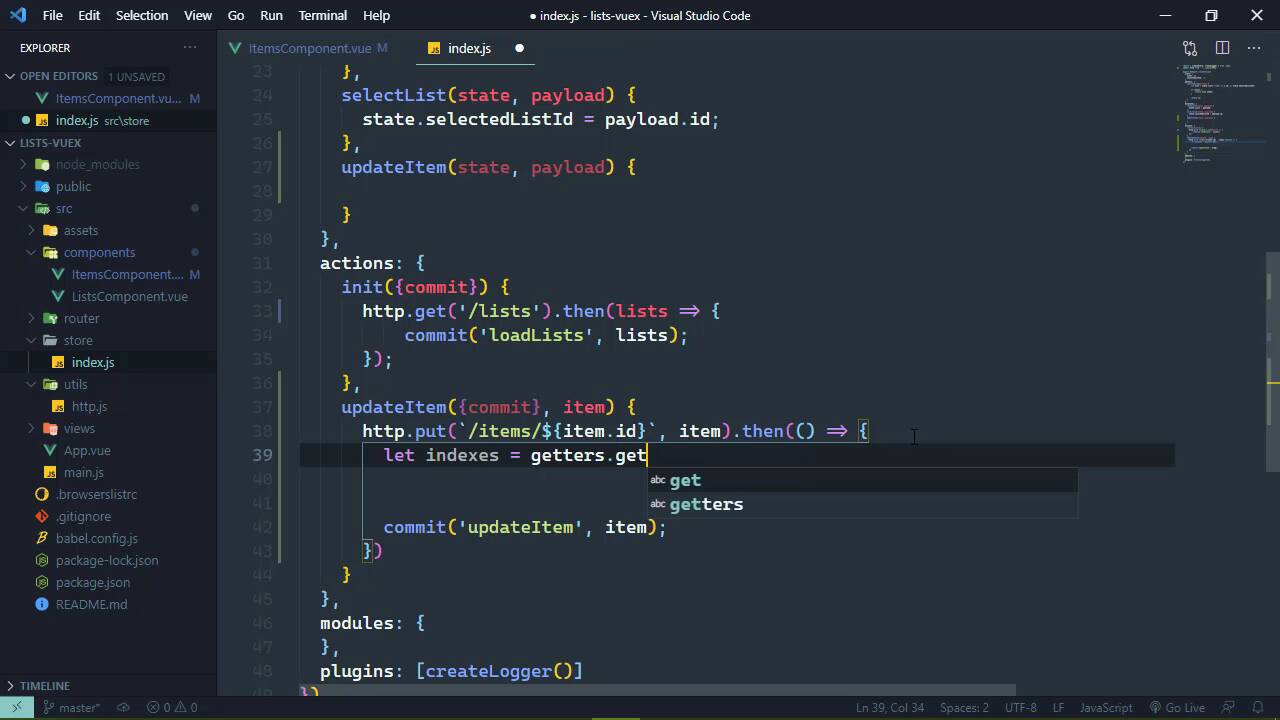
- Overview
- Transcript
3.2 Getter Methods
You can write getters so that they can be called as methods. You'll learn how (and why you'd want to) in this lesson.
1.Introduction
1.1Introduction01:25
2.Using Vuex
2.1Setting Up the Project05:54
2.2Displaying a List07:03
2.3Adding State04:57
2.4Committing and Tracking Changes09:03
2.5Using Getters to Compute Values08:44
2.6Dispatching Actions to Perform Asynchronous Work06:53
2.7Using Mapping Functions08:14
3.Advanced Vuex
3.1Using Vuex With the Composition API08:17
3.2Getter Methods09:04
3.3Don't Track Everything and Make Your Actions Chainable13:21
4.Conclusion
4.1Conclusion00:57
3.2 Getter Methods
In the previous lesson, we laid down the groundwork so that we can update an item. So all we have to do is just implement that code. We have the UI all set up, we have an event already hooked up to it, so let's just dive right in. Now we stubbed out this dispatch of the updateItem action. So the question then becomes, what payload should we provide this action? Well, a lot of our decisions is really based upon what the server is going to expect. So whenever we update an item, it needs the ID because that's part of the URL. It also needs the text because it will update the text with whatever is provided in the request body as well as the status. So we need to provide just about everything about this item. So we will start with the ID and the text which are of course part of the item itself. But when it comes to the status, we are just going to hard code this as true, because remember that this is a method for completing an item. So we of course want to set the status of true. And with that all we need to do is focus on our Vuex store. And the first thing we need to do is make our request. So let's stub out this update action, we of course are going to need to commit, but we also have our item payload. Now off screen, I have added an http module. And it's very simple, and I figured that you would want to be more focused on Vuex stuff as opposed to watching me write an http module, but it's very simple and straightforward. It's simply exports an object with four methods, get, post, put, and delete, all of the things that we need to do, and it will make requests to our service. So all we have to do is provide the end point. And then it's going to handle everything else. It also assumes that all of the responses are going to be in JSON. So it's going to automatically parse the JSON into an object, so we don't have to worry about that. So inside of our init, where we are calling fetch, we could use our http module to do that. We would just need to call its get method, and then the URL would simply be just /lists, and we no longer need to parse the response because that is automatically done for us. And there we go. We of course do need to import this, so let's go ahead and import that at the top. And this is from, we need to go to the parent directory then utils/http. So that gives us that module. So inside of our updateItem, the very first thing we need to do is make our http request, which is a put request. And this needs to be for our items endpoint and we need to provide the item.id. And then as the second argument, we need to provide the item payload so that that will have all of the information that the server needs to update. And then when we get a response back, we will update the UI. So here we could just commit a mutation which we could call updateItem. But then the question becomes, what do we provide here? I mean, yes, we do need to provide the item information, but let's go ahead and stub this mutation out so that we have updateItem, we have our state, and then we have our payload. There's not a whole lot of information here. All we have is the item.id, the text and the status, we have nothing else. So in order to access an item object, we have to first of all find the list that it is a part of, and then find the item that it needs. And we can't do any of that from inside of a mutation. Well, actually we can, the question is should we? And the answer is no. Because our mutations are pretty much strictly for setting data, they need to be supplied the information so that that's all that they have to do is just mutate state. So here's actually what we could do. We could write a method. It's actually a getter that would allow us to call it as a method. So that then we could get all the information that we need, such as the list that we need to update as well as the item that we need to update. And we could do it like this to where we would use our getters, and then we would call a getter as a method. And we could call it getListItemIndexes, and then we would pass in the item.id to get that information. Now, first of all, getters is part of the context that is being passed to our action. Remember that this is a context. It's a lot like the store object that we are working with, but it is not that store object. But it does have state, it does have the ability to commit, to access getters, we can even dispatch other actions if we need to. So with a getter like this, we could assume that this would return the indexes of the list and the item. So that the payload that we provide to our mutation would contain everything that we need. It would have all of the item information, and it would have the indexes of the list and the item that we need it to update. So then for our updateItem, instead of payload here, we could destructure this, so that we have the text, status, list, index, and then itemIndex. And then the code for updating all of this would look like this. We would first of all retrieve our item using our state, and then the provided indexes, then once we have the item, then all we need to do is update the values for that item. So that we can set the text = text and then the status = status. So that is what we would want to do. All we need to do then is implement this getListItemIndexes, that's a mouthful to say. So let's go to our getters, and we are going to start off just like a normal normal getter, so that we are accessing our state here. But then we are going to return a function that accepts the itemId that we want to find. And then we just need to write the code that's going to find all of this information. So let's start with two variables, we'll have the listIndex, which initializes as -1, and then the itemIndex, and that is -1 as well. And then we just need to iterate over all of the lists so that we can iterate over all of the items inside of those lists. It's complicated, but really it's not. So we're gonna start by iterating over our lists. So we want to iterate for as long as our counter is less than the state.lists.length. And then we of course want to increment our counter there. But then we also need to iterate over all of the items within the list that we're working with now. So we'll have a different counter variable here and we want to iterate for the state.lists at the provided index and then items.length. And then of course we will increment our item counter. So that inside of this for loop, to make things a little bit easier, we will have our item. So we will once again go to our lists, provide the list index that we are currently at, and then items and the itemIndex that we are currently at. And then we will simply check to see if the item.id is equal to the provided itemId. And if it is, then we will set listIndex equal to our list counter, and then itemIndex equal to our item counter, and then we will break out of the loops. So that then we can finally return an object that has the listIndex and the itemIndex. [SOUND] Okay, so with that done, we should have everything in place so that whenever we go to the browser, let's do a hard refresh. Let's click on the Fender Telecaster. And it at least updated on the UI, let's refresh the page again, and viola! We can see that we can update our item now. So getters can be use in two different ways. You can write them to use them as properties, you can also write them to use them as methods. And there's really no hard and fast rules as to when to go for property or when to go for a method. It really depends upon your usage, what makes sense to you.


