

- Overview
- Transcript
2.6 Updating an Existing Invoice
Once we are able to view and create invoices, odds are we'll eventually need to make changes to existing invoices. In this lesson, we'll add support for HTTP PUT requests that will make changes to existing resources.
1.Introduction
1.1Introduction00:53
1.2Prerequisites05:48
1.3Setting Up the Development Environment07:41
2.Building the Rest API
2.1Creating the Invoice Model08:10
2.2Adding a Serializer05:06
2.3Getting All of the Invoices07:52
2.4Getting an Individual Invoice07:58
2.5Creating a New Invoice08:49
2.6Updating an Existing Invoice05:21
2.7Deleting an Invoice02:59
3.Conclusion
3.1Goodbye01:19
2.6 Updating an Existing Invoice
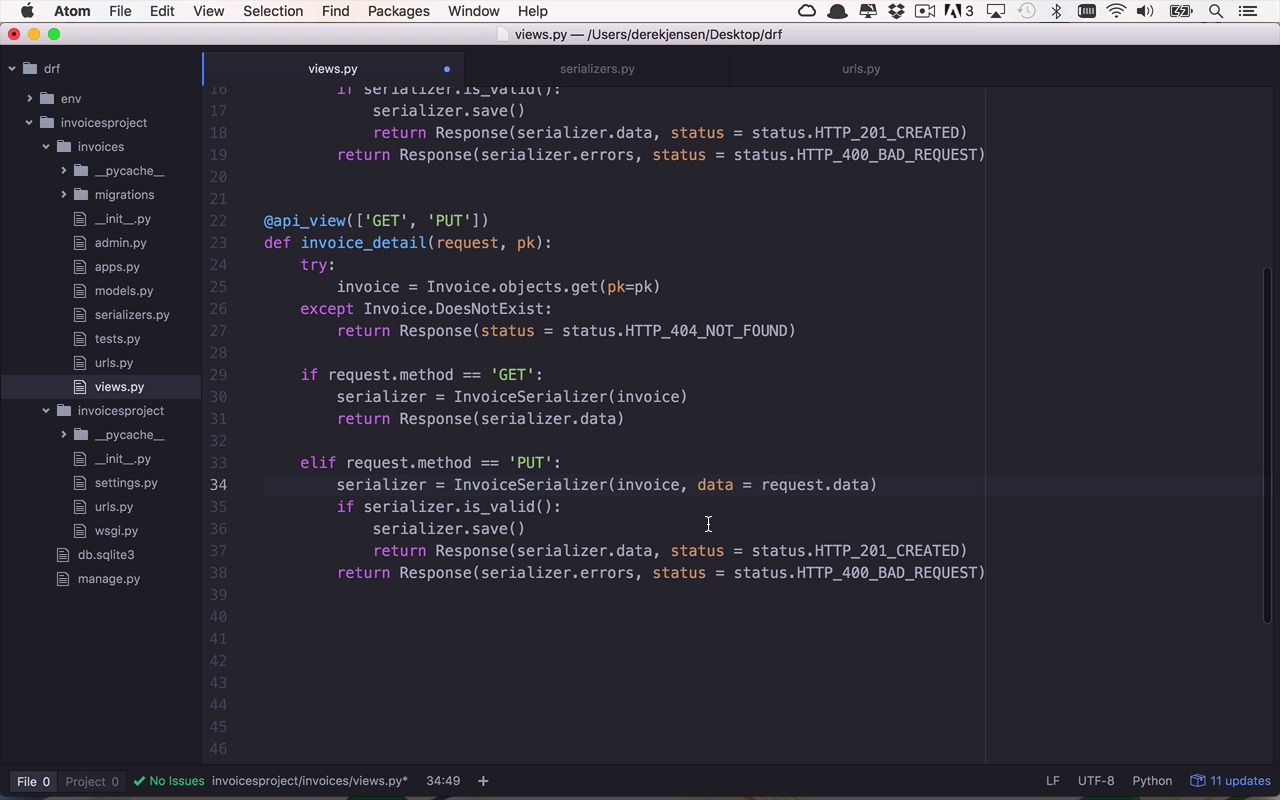
Now that we can not only get a list of invoices but also an individual invoice as well as creating a new invoice, what happens if I create an invoice or I notice that there's some invoice within my system that is incorrect that needs some updated information or some updated data? How do I handle that scenario? Well, we're gonna handle that very similarly to how we handled the create situation as well. So you noticed when we wanted to create an object within our system, we used a POST request, and we sent it to the list function. Well, similar to that, we're going to modify a model or a resource within our system via a different HTTP method, but it's not a POST, it's actually going to be a PUT. And we're going to issue this PUT request to the detail function as opposed to the list function. So a little bit of a change there, but nothing too crazy. So we're going to handle now a PUT request, and now we need to modify this detail here just a little bit. So I'm going to bring this up a little bit. So in this case, where we did the returning of this serialized data, this was happening when the request.method is equal to GET. So now we need to add that in because we're gonna add some functionality for an additional method. Now we're gonna drop back down, and actually we're going to copy this information here cuz what we're gonna do here is gonna be quite similar to that. So we're gonna drop down a little bit, and we're gonna handle the else if scenario, but in this case, we're handling a PUT, not a POST. So similarly, we are going to create a new serializer here with a small change. So not only are we going to set the data property here, but we're also going to come in here, and we're gonna say that we're dealing with a particular invoice. So not only did I attempt to get this invoice via the primary key which I obviously got because I skipped past this exception. I now come down into my PUT section of my function, and now I'm going to get a serializer that is associated with that particular invoice that I found, and I'm also going to take the data that was passed in via the request. And now I'm gonna try to overwrite the existing information on that invoice with the data that was passed in. Once again, I'm going to check to make sure that everything is valid, and if it is, I'm going to run the save function again to save the changes to that invoice, and then I wanna return a response. Now in the world of REST APIs, you are going to return 201s created for POSTs where I'm creating a new object. But typically for an update or a PUT, if everything works successfully, you're going to send back a 200 which equates to an okay, just like I did with the typical GET up here. So we wanna do the same thing, but once again, if for some reason, the serializer.is_valid function fails or is not true, then we're gonna return a response that's going to contain those errors as well as a 400_BAD_REQUEST. So let's go ahead and save our little modification here, and we're gonna jump back into our terminal, and let's go ahead and stop this again. We're gonna clear this out. We're going to restart it just to make sure everything is typed in correctly, and it looks as though it is. So let's go back into Postman, and let's go ahead and reissue our request to get our invoices. And we still have our same invoices, but now we want to make a change to invoice number three. So let's go ahead and grab this invoice, the entire body. We'll open up a new tab, and we will change our request to a PUT, and we'll come into Body, we'll select raw. We'll make sure that this is an application/json. Let's go ahead and paste our body in here, and we're also going to have to grab the same URL to get this individual resource this time. So we're gonna grab this URL, we're gonna paste it in here as our request, and we're also gonna make sure that we are requesting that specific invoice with that idea, in this case id:3. So now let's change a few things here. I'm gonna make this instead of my newest, I'm just gonna make this My Favorite Invoice. And instead of being $25, this is going to be $250, so obviously, you can see maybe why this might be my favorite invoice. So now I've modified a few of the properties here for that particular invoice for id:3, and I'm gonna go ahead and issue this PUT request. I'm gonna hit Send, and I'm gonna come back down, and I got a response. Same id, id:3 and now My Favority Invoice, so I did spell that wrong, but everything seemed to be updated correctly. So I can actually come back in here and modify this again and say this is actually My Favorite and hit Send again, and now it updated it again. So if I were to come back to my GET request to get all of my invoices and hit Send, you can see now I still have two invoices here. But now I've been able to successfully update invoice number three to have a different name as well as total unpaid. And now I'm able to change existing information that already exists within my application via a PUT request.


