

- Overview
- Transcript
2.3 Getting All of the Invoices
Now it is time to start coding the API itself. In this lesson we’ll cover how to handle HTTP requests using views, routes, and a few little helpers provided by the Django REST Framework. In this case, we will graciously respond to GET requests by returning a list of all the invoices that are currently stored within the database.
Related Links
1.Introduction
1.1Introduction00:53
1.2Prerequisites05:48
1.3Setting Up the Development Environment07:41
2.Building the Rest API
2.1Creating the Invoice Model08:10
2.2Adding a Serializer05:06
2.3Getting All of the Invoices07:52
2.4Getting an Individual Invoice07:58
2.5Creating a New Invoice08:49
2.6Updating an Existing Invoice05:21
2.7Deleting an Invoice02:59
3.Conclusion
3.1Goodbye01:19
2.3 Getting All of the Invoices
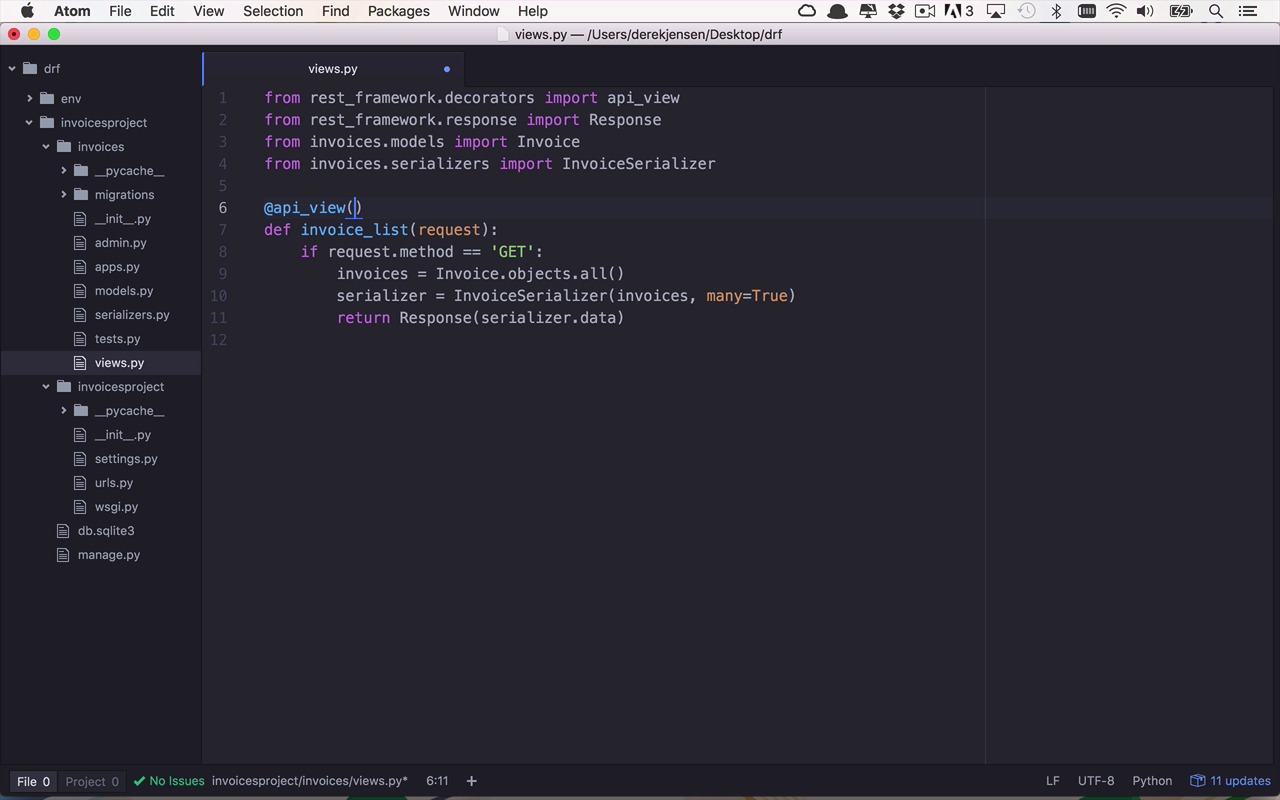
Now that we have our model and our serializer all set up, we need to start to integrate this into the actual web aspect of our application. So to do that we're gonna have to make a couple modifications and it should be fairly simple. So let's just go ahead and get started. So the first thing that I wanna do is I want to create a view into my application for this rest API. And the way that I'm gonna do that is fairly similar to how I would create a normal view in the world of Django. So, let's start within our views.py file within our invoices app. So I'm going to overwrite pretty much everything that's in here and I'm gonna start by importing some things that are from the Django rest framework. So I'm gonna say from rest_framework. The first thing that I want to import is actually a decorator api_view. And I'm gonna show you what that's for in just a little bit and this is actually in .decorators like that. So, after that I also want to import from the rest framework.response. I want to import the response class and I'm gonna show you how to use that in just a moment as well. And then the other two things that I need to import are actually from my application, in models I want to import my invoice model. And then from the serializers, I want to import my InvoiceSerializer, just like that. Okay, so as with any other views, we want to define a function in which I'm going to ultimately wide up handling a request that we're going to use this API view decorator for. So let's take a look at this first. So the first operation that I wanna handle within my API is when somebody wants to make a request to get a list of invoices, I wanna be able to return that list of invoices. So we're gonna call this the invoice list of function. So this is going to take in a request. And we're gonna use this request to determine a couple of different things. Now I'm going to show you a little bit of a trick here to be able to determine what type of a request this is, so we can check the method that's associated with this request. And that is an HTTP method. So this could be get, put, post, delete so on and so forth. So what I wanna do right now is I wanna handle only the GET request for a list of invoices. So I can say if request.method = GET. So that's all I wanna handle at this point. I only wanna handle the GET. And what do I wanna do at this point? If the user issues I GET to get all of the invoices, first I need to get all of the invoices that I have within the system. So let's go ahead and do that first. I'm gonna say invoices is gonna to be equal to invoice.objects.all. That will give me all the invoices. Then I need to get my serializer and I'm going to set that equal to a new instance of my invoice serializer. And I'm gonna pass in a list of invoices but in this case I'm dealing with more than one object here. So I have to set the many property equal to true to say there's gonna be many objects in here or it's a collection or a list of invoice objects. And so once I've done that now I can return a response. And this is where I'm gonna use that response object and I'm wanna pass in what that response is going to be. And since we're dealing with a rest API, It makes sense to be returning JSON. So we're gonna say I want to return serializer.data just like that. So let's go ahead and hit save here. Now one thing that's gonna come very important here i s to use some of the built in helpers that come with the Django rest framework and one of the nice ones is actually this api_view. So what I can do is use this decorator as api_view and I can specify what methods that this particular function is going to handle in the world of my rest api. And in this case I need to pass in a list of those methods. And in this case I'm only gonna deal with one. So on this particular invoice list function is going to be the api_view handler for a Get request. Okay, so now that we've done that we can go ahead and save that. But now we need to wire up some of the URLs to be able to take advantage of this view. So typically what I like to do is if I have URL handlers that are specific to my application I'd like to create another sub urls.py file within my app. So I'm gonna say this is the urls.py. And now I can set this up very similarly to how this file is set up here and so because of that I'm actually gonna copy this and bring it over. And then we're just gonna tweak it a little bit. So what I wanna do here is I'm gonna use this URL that's the same. I don't need this admin stuff but what I will need is I will need to import from invoices. I'm gonna need to import my views and that's exactly what I just created previously. So now at this point I want to handle certain requests that begin, not with admin, I'm not worried about that any more. But anything that begins with invoices, I want to handle that type of request and I wanna pass that off to a particular handler which I just created in the other file views.invoice_list, so just like that. So let's check this out. We have our invoice list over here within our view and then within our URLs file we have the requests coming in for something that starts with invoices. We wanna pass it off to that function. And now the other thing that I have to do is I actually have to tweak this one just a little bit, because since we're only dealing with the invoices handler in this case I'm gonna say for any requests that come in I just want to punt you over too and include here of invoices.urls. So I'm just gonna punt over to that other file and I'm going to need to also import that include. So let's go ahead and save that. So within our view we've created our Get handler for getting a list of invoices and we have all of our imports here. Then within our URLs we are not gonna say anything that starts with invoices to funnel you over to that view. And then within our main URLs file we're just gonna say for all the requests coming in just go over to invoices.urls which is right here. So let's go ahead and save all of these files. And once we've done that we can switch back over to our terminal and we can run our server. And if everything has been typed in correctly, which it looks like it has, we now have our web server up and running once again on port 8,000. And if everything is working correctly, we can switch back over here to our web browser and we can try to go back to that original page. And now we're gonna get a page not found because we're no longer issuing a generic handler that's gonna handle all these requests and just put up this nice little page for us. But if we've done everything correctly, I can go over to invoices, do /invoices. And now I'm being funneled into my invoice_list request and as you can see here, I am getting back a list of all my invoices within my system shown right here. Now this is all kind of some sugar that's put together by the Django REST framework for me, but this is just a nice little UI to be able to see what's going on. So at this point, you can see I issued a request to invoices, it's being handled by the Invoice List function. And I can see I got a 200 back and that's a standard status code for issuing a GET request that is successful. A 200 and an OK. And I am sending back this JSON list of objects which only has one right now with my initial invoice object in it. So to this point now, we've built a very simple handler to get all of the invoices within our system.


