

- Overview
- Transcript
2.4 Getting an Individual Invoice
Sometimes you don’t care about all of the information found within an application. You may only want a single piece of data. Within our application, that means only wanting a single invoice. Let's make a few small changes to allow our API consumers to get the information they need about a specific invoice.
1.Introduction
1.1Introduction00:53
1.2Prerequisites05:48
1.3Setting Up the Development Environment07:41
2.Building the Rest API
2.1Creating the Invoice Model08:10
2.2Adding a Serializer05:06
2.3Getting All of the Invoices07:52
2.4Getting an Individual Invoice07:58
2.5Creating a New Invoice08:49
2.6Updating an Existing Invoice05:21
2.7Deleting an Invoice02:59
3.Conclusion
3.1Goodbye01:19
2.4 Getting an Individual Invoice
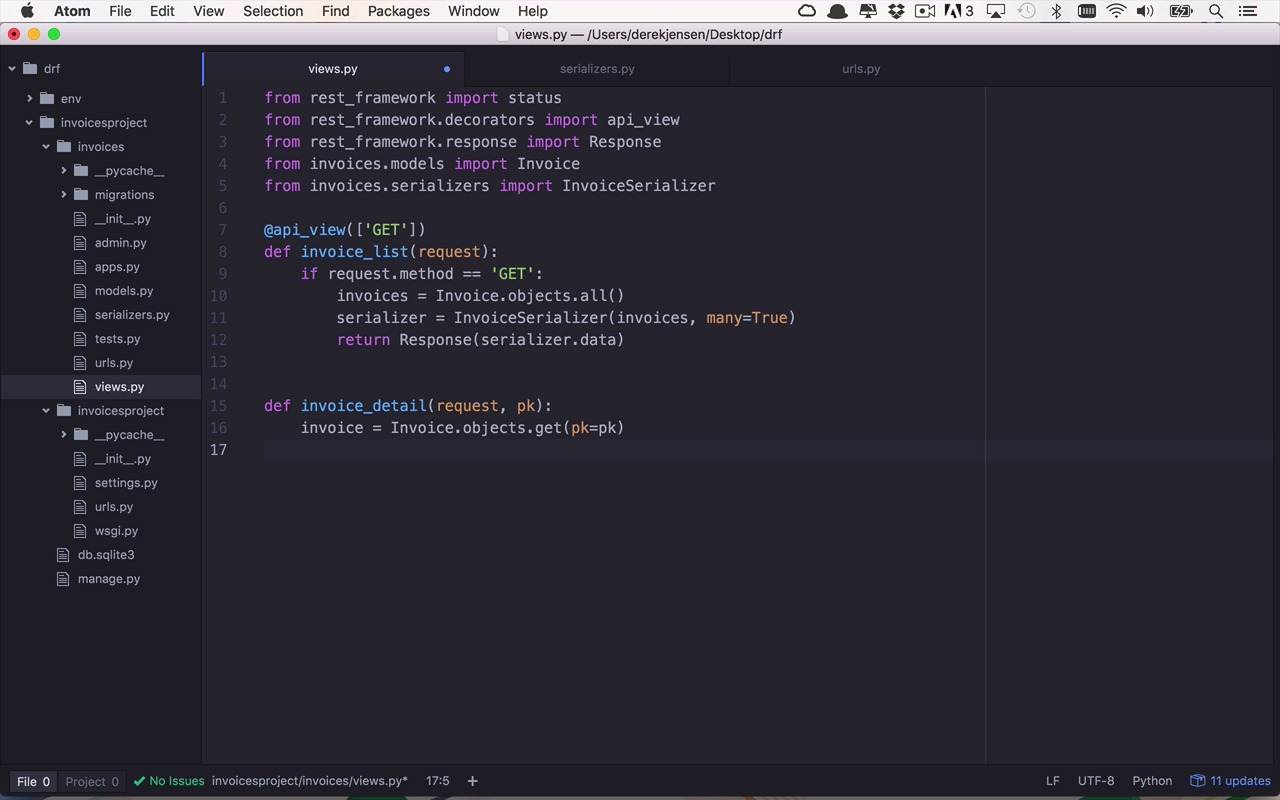
Well what we have so far is going to work really well as long as we're always interested in getting a list of everything that we have within our invoices collection. And that's not always going to be the case. There's going to be times where we will only want to get information about an individual invoice or an individual model within our application and that's fairly easy to do as well. But we're going to have to make a couple of tweaks here. So once again, let's start by modifying our view here to handle the situation where we want to get a single model or single invoice. So we're going to start by creating a new function so I'm going to define maybe in this case an invoice detail. And once again this is going to take in a request but it's also going to need to take in some sort of way to uniquely identify an invoice within the system, but how do we do that? Well, there's a little bit of a trick that I've kind of skipped past so let's rewind a little bit and talk about the way that models and serializers work within the realm of Django. So when we created our class here we created a number of properties here. And then we went in to our shell and we created an invoice, and we saved it to the database. Now there was also some other behind the scenes happenings going on there, and the important thing to know is that every time time you create a model and you save it to the database. By default you also get this certain magical property called ID. So every time I create a new invoice or a new model and I save it to my database, a unique ID typically an integer is assigned to that object within the dictionary so that I can retrieve that object by some sort of unique identifier or a primary key and that is this magical Id property. So where is that Id property? Well it's in there, but we're not doing anything with it right now. So what I wanna do is I wanna go into my serializers here, and I'm gonna add a field. And I'm gonna add a field that's gonna look a little strange because you're gonna say, well we didn't create an ID field on our invoice but, it's actually there in the database and you're gonna see this momentarily. So, let's go ahead and save that now that we've added ID to the fields that we wanna serialize. So, let's come back to our view here. And like I said, one of the things that we're gonna need to pass into this particular function is an identifier or a primary key. So we'll just call it pk for now. So now within this function we're going to do a couple of things that are very REST APIish. So the way that we communicate to the consumer that something either worked or didn't work is typically using HTTP status codes. So as I mentioned in a previous lesson, if you issue a GET request and everything works properly then you're gonna get to an HTTP status code of two hundred which means okay thumbs up everything worked. Now there's a number of other codes out there that are for specific purposes that are either used properly or not out in the real world, but for now we're going to try to keep things fairly simple. So what I wanna do is I actually want to bring in one other little helper here. So I'm gonna say from rest_framework I want to import status so there's a little bit of a status helper that's going to give me access to all of the status codes. In word format, so I don't have to remember what all of the numbers are. So we'll go ahead and save that as well. So let's come back into our invoice_detail function. And the first thing that we want to do is we want to try to get the invoice that is associated with the primary key that is sent in. So we'll say invoice is equal to Invoice.objects.get, and this time I want to get the object that has a primary key associated with the primary key that was passed in. So this would typically be okay but what happens if it's not there? So in the world of Django and using the database in there of, if I request an object that has a primary key of some identifier and it doesn't exist. I actually get an error I get a does not exist error. So I have to be able to handle that in this scenario because I just don't want to explode every time somebody requests an object for an ID that doesn't exist in my system. So we do that via a try block. So we want to try and get this invoice. So what's gonna happen here if this doesn't exist, I will get an error. So I need to handle a certain exception here, and in this case it's going to be the Invoice.DoesNotExist scenario, and we'll play with that in a little bit. And in this case, I want to simply return a response, with a status eual to status.HTTP_404_NOT_FOUND. So the 404, the status that's typically associated with requests where you try to get a specific object that doesn't actually exist and you return a 404. So let's go ahead and save that. So now if the invoice does exist for that ID, then I want to do something very similar up here. I want to go ahead and serialize that and I want to send it back out. So let's go ahead and grab this from our list and we'll just modify it a little bit, so we'll paste that in here. In this case I'm only dealing with a single invoice like that. And I just want to return that data. So let's go ahead and save that now. So now we've modified our view to handle not only the list case but also the detail case. So in this case, I'm also going to decorate this with API view and this is also going to handle just the GET requests, so when I'm getting an individual invoice within my system. So once again if I'm going to handle this, I need to modify my URL's a little bit to handle the case where I'm passing in a primary key. And the way that that's typically done is within the URL. So let's go ahead and copy this and paste this down here, then I'm gonna insert a little bit of a regular expression here. Don't get too bent out of shape about this, it's not too big of a deal. So what I want to do is I want to be able to pass in a named key here with a primary key being that name. And I'm going to handle the situation where I'm passing in some sort of digits zero through nine and some sort of list of those digits. So it could be not only a single digit but it could be some sort of variable length number of digits here. And go ahead and save that, but in this case I'm not going to list any more, I'm going to detail. So let's go ahead and save that. So now that I've modified my serializer to be giving back the ID and I'll show you that in a second. I now have a new function within my views it's going to get an individual invoice detail based on some primary key that I pass in. And once I've done that I'm going to make sure that I'm handling the inputting of that particular primary key within the URL. So let's make sure everything is saved then I should be able to switch back over to my terminal. Let's go ahead and run this guy again and let's make sure everything is running, and it is. And if I go back over to my browser again, so here's that page that we originally had so right now you don't see an ID. But if I refresh this page now you see that that individual invoice does have an ID, a unique identifier of two. And if I wanted to get that back specifically, I could go up to my URL now and append that on to that ID on to the end of my URL two and hit enter. And now I'm getting invoice detail as you can see here. And I'm just getting an individual object that's denoted by these curly brackets instead of the list of objects like I was getting before with the square brackets. So now we can get a whole list of objects as well as an individual invoice within the system.


