
 Lessons: 12Length: 1.4 hours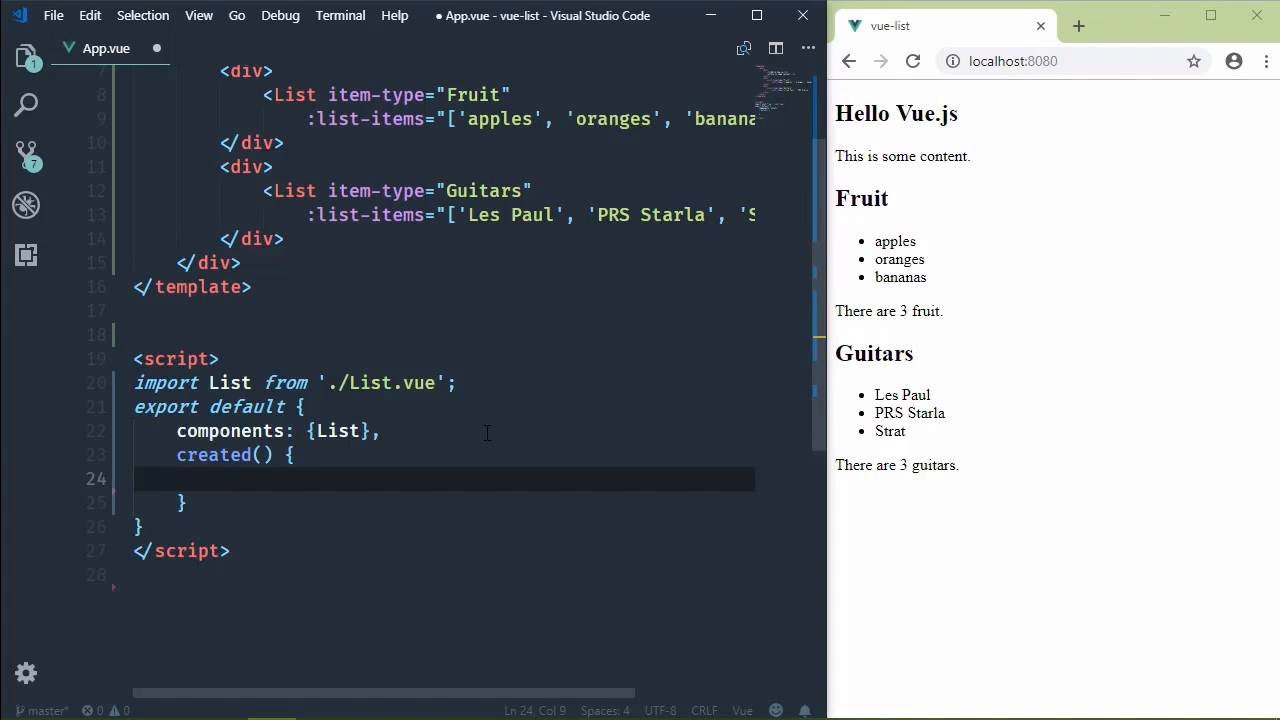
- Overview
- Transcript
3.3 Using External Data
Hardcoding our list items works for demonstration purposes, but in a real app we'll usually want to load our data from some other source. In this lesson, I'll show you how to use the Axios HTTP client library to get data from elsewhere on the web and pass it to your list component.
1.Introduction
1.1Introduction01:48
2.The Obligatory "Hello World" Example
2.1Basic Structure04:55
2.2Single-File Component Structure09:51
3.The List Example
3.1Passing Props and Iterating a Collection12:41
3.2Displaying More Data08:56
3.3Using External Data11:41
4.The Contact Form Example
4.1Building the Form08:45
4.2Handling Events08:42
4.3Binding Form Controls to Component Data06:07
4.4Defining Computed Properties04:40
4.5Manipulating Style05:48
5.Conclusion
5.1Conclusion00:58
3.3 Using External Data
Our list component is coming along very nicely. It started off very, very simple, and it's still simple, but we are at least showing more information about the list. We are showing what type of information and how much information. So in this lesson we are going to, well, it's going to be more a real world scenario. Because typically, if you have a list component, you usually don't hard code the values for that list. Instead, you supply that component with data from the server. So we are going to do that in this lesson. The first thing we need is data. So we're going to use a JSON file. And this needs to go inside of the public folder. And we're gonna call it guitars.json. And the structure will look like this. We'll start with an object that has a property called items. That's going to be an array. And the elements are going to be string values. So we will have Gibson Les Paul. We will also have the PRS, let's go with the Vela instead of a Starla. And then let's have the good old Fender Strat. So that's our data. We will retrieve that using Axios. Now, we don't have to use Axios, we could use Fetch or XML HTTP request, but I like Axios. It just makes life so much easier. So we are going to install that and make it part of our project. We'll say, npm install axios. I don't really know how to pronounce axios. It could be axios. Don't know, don't really care. I'm gonna call it what I want. And we are going to save this to our project. Now, while this is being done, there are different approaches that we can take for making HTTP requests in our Vue components. And there are many different opinions, and some people are married to their opinions. I'm not one of them. I think that there really is no incorrect way of doing what we are going to do. I think a lot of it has to do with certain situations, but a lot of the options available to us are very good options. And we will briefly talk about them. But first, we need to go ahead and run our service. So what can we do? Well, the first thing is we could write a specialized component that wraps around the list component. We could call it HTTPList, or something like that. So that's inside of app. Instead of using our normal list, we could use an HTTPList. We would still pass in the item-type. But instead of specifying the list items, we would instead pass in a URL. And then that HTTPList would be responsible for making the request and then passing that data on to the internal list. That's perfectly valid. I have done that. I know other people have done that. I mean, that is a good approach. Another approach is from the mindset that this List component is really controlled by our App component. Our App component has the List component. It's supplying the data to it. So you could say that our App component is controlling the List component, so therefore, it should be responsible for making the HTTP request and then providing the data. That's valid too. I have taken that approach, other people have taken that approach. And that's the approach that we are going to take because that gives us the ability to talk about two very important things. But there's also a third way. We could say that, well, the List component itself should be responsible for that. Don't make a specialized component, just bake that capability into the List component. And then its behavior can change based upon the props that are passed. Well, yeah, that could be fine too. I'm not gonna say that that's incorrect, but I think the other options are better options because they provide more flexibility. And they also don't make it as confusing. Because if you change the behavior of your components based upon the props that are passed, then you have to remember, okay, what do I need to pass? What are the prompts that are responsible for this behavior and that behavior? And so, I wouldn't say that that's incorrect, but I think that there are better options. Okay, so, we are going to make our requests inside of the App component. And the first thing that we need to do is decide when. How, first, and when? Well, we have what we called are lifecycle hooks, because every component has a lifecycle. And you can think of these kind of like events that occur. So as a component reaches a certain parts of its lifecycle, it's going to essentially execute a method. Now, we can hook into these events very easily. We don't have to say addEventListener, or anything like that, we just have special methods that we use. So the first one is called created. This executes whenever the component is just created. It's not in the DOM, there's no data there or anything, it's just created. There's another method called mounted. This executes whenever the component is mounted in the DOM. So by the time the mounted method executes, it exists in the DOM. There is a destroyed, which as you can guess, executes whenever the component is destroyed. Now usually, if you're going to hook into any one of the lifecycle events, it's more than likely going to be created or mounted, and that's going to be our case. The only thing is, when do we need to make an HTTP request? Well, I'm going to make the argument that we should do it at created. That is so that we go ahead and we issue the request, nothing is in the DOM yet, so that maybe by the time it is in the DOM, we have data back from the server and we don't have any flickering or anything like that. Because one of the beautiful things about Vue is that it will automatically update the DOM with any change that we make to the data. So if we pass in an array to our list of guitars and then that array changes, well, it's going to automatically update the DOM in the browser with those changes. So we are going to make a request in the created method. So let's go ahead and write that code. But first, we need to import axios from axios so that we can use it in created. We will call the get method. And our URL is simply going to be guitars.json. Then we will do something with the response. And the data property on our response is the parse JSON object. So that means that we have that item's property that has our array. So now the questions is, how do we get our items to our list? Well, the first thing I wanted to talk about was the lifecycle events. The second thing is the data of a component. We have props, that's how we pass data to a component. But a lot of times, we need internal data to work with inside of a component, and so we have something called data. It's actually a method though, it's not a property. The reason is because we need a factory function to return our data object. It's kind of like the default value for the array that we specified for our list items prop. It's kind of that same thing, except that in this case, it's going to return an object. And then this object is going to have the properties that we want to keep track of. So, in this case, we're going to have some data called guitars. It's going to be an empty array to begin with. And then whenever we get a response back from the server and we have data to work with, all we have to say is this.guitars =, and then the items array. Now notice what I've done here. I didn't say this.data.guitars. I said this.guitars. So anytime we refer to our data or we refer to our props, which we don't have props here, but in the List component, we have the listItems prop, within our JavaScript code, we prefix them with this. Because they are instance data. So that's it. Let's get rid of that. And so now we have this data that we can use inside of our template, and we use it just like everything else. So let's get rid of the array that we are passing as the list-items, and here, we say guitars. Now if you notice, I'm not saying this.guitars. That's because this is automatically implied. If we look at the List component, we kinda saw the same thing. If we were in JavaScript and we were going to refer to our props, we would do so with this dot and then the prop name. But in our template, we don't do that, we just simply use the name of our prop. So the same is true for our component's internal data. So I'm going to save this, and whenever I do, we should see our list automatically update. If not, then something obviously went wrong. And it looks like something obviously went wrong. Let's do a refresh, there we go. So no, nothing went wrong. We just needed to refresh the page. So now we have different data, so we know that our code works. We made a request from the server inside of the created hook. Whenever we get a response, we set our component's internal data to the items from our JSON file. And then we pass those guitars to our List component. Well, in the next lesson, we're going to say goodbye to our List component and we will build a Form component. Which will give us the opportunity to talk about events and many other things.


