
 Lessons: 12Length: 1.4 hours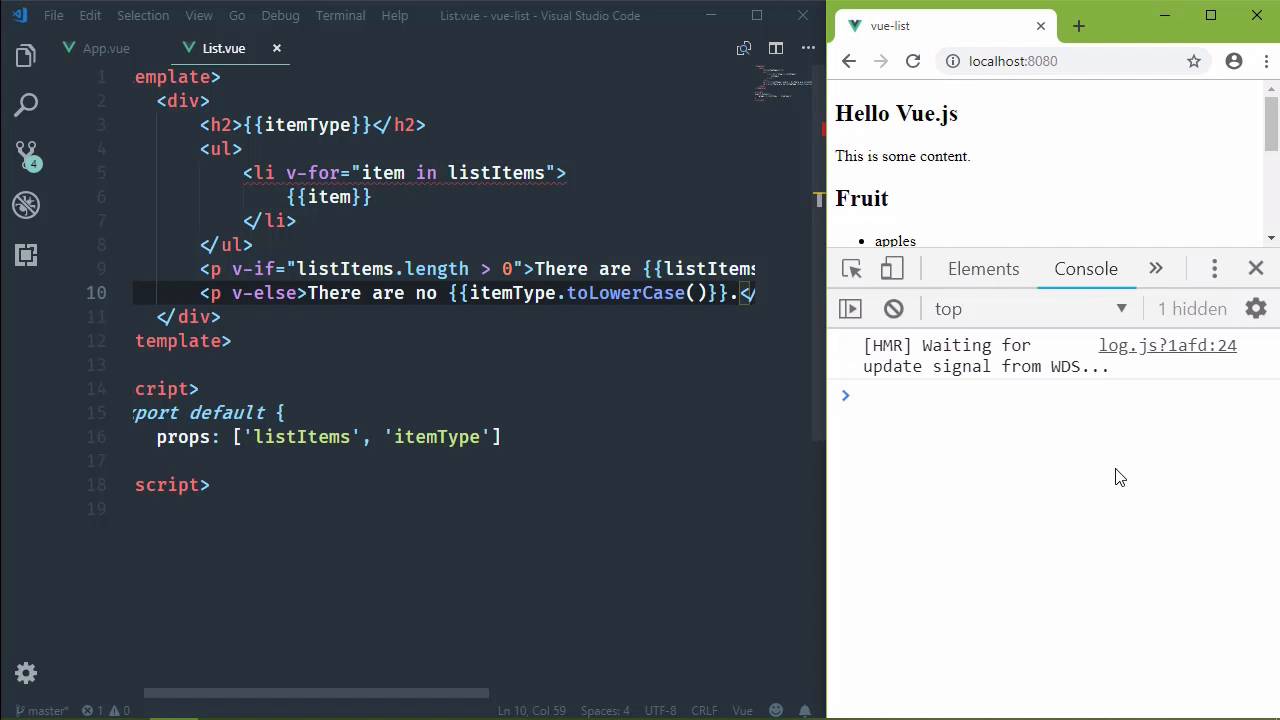
- Overview
- Transcript
3.2 Displaying More Data
Our list component does its job, but let's enhance it to provide a bit more information about the data it displays.
1.Introduction
1.1Introduction01:48
2.The Obligatory "Hello World" Example
2.1Basic Structure04:55
2.2Single-File Component Structure09:51
3.The List Example
3.1Passing Props and Iterating a Collection12:41
3.2Displaying More Data08:56
3.3Using External Data11:41
4.The Contact Form Example
4.1Building the Form08:45
4.2Handling Events08:42
4.3Binding Form Controls to Component Data06:07
4.4Defining Computed Properties04:40
4.5Manipulating Style05:48
5.Conclusion
5.1Conclusion00:58
3.2 Displaying More Data
In the previous lesson, we created a list component, and it's very useful we can use it to display a list of anything. But just because we have a working component doesn't mean that we can't improve it. I mean because after all this is very bare bones, it would be nice to have a little bit of extra information. Like for example we have a list of things and there's really no label as to what they are. Now of course, we could read these things and figure out what it is, but let's make it explicit. So let's have another prop, and we'll call it itemType. And so we will pass that prop whenever we pass in the listItems. So we don't need to use v-bind in this case because the itemType should be just a string. So we'll say itemType and in this first list it's going to be Fruit, and then for the second list, it's going to be Guitars, and we'll use the plural form of those. And so now we just need to use that data. So before RUL element, why don't have an h2? And we'll simply output the itemType. So that now whenever we say we see the Fruit and the Guitars labels that's great. But it would also be nice to have a count so that we could just without having to count [LAUGH] each item, it tells us how many items that they are. So after our closing ul tag, lets let's use a p element. And we can say There are and then we will have our listItems.length property. And let's also use our itemType here just so that we're not being generic. If we have a label of Fruits, then we list the fruit, it would be kind of weird to say that there are three items. We could say there are three Fruit. But let's use the toLowercase method so that it kind of fits into that sentence. Now, remember from the previous lesson that I said anything inside of the double curly braces is a JavaScript expression. So that's why we are able to use the length property on our listItems array. That's why we are also able to use toLower case on the itemType that we have. So now by saving that we see our counts down there, we need a period to close that. But you know what? We really only want to see that if there are any items. So there's another directive that we could use, it's called v-if. And it works just like an if statement in JavaScript. So if listitems.length is greater than 0, then of course we want to display that message. Now, of course that is true because we are passing more than one thing, but we're gonna change that so that we can have a list but not any data. Now you might ask why we are going to do that? And that's because in the next lesson we are going to get data from a data source, like json file and there may or may not be data. This was we have ourselves covered. So, if we have an if directive, then it kind of goes without saying that we have an else directive, so we could use that. And then we could say, There are no, and then we could use the itemType again. Let's go ahead and call toLowerCase again, just so that it fits within the sentence, and there we go. So we don't have any errors, at least compiling errors. We do seem to have some errors regarding the well, one thing about the Vue CLI is that whenever we make a change and we save it, it doesn't actually refresh the page. It uses Webpack's Hot Module loading. So really what we want to do is clear out the errors, do a hard refresh and then we will get just the errors that we have. Because as you are typing, there are going to be errors. But as you can see, we don't have any errors so we're good to go there. Now let's do this. Let's go to our Guitars list and let's not pass anything at all. We'll still have the itemType but we won't pass any list items and let's save it. Now we don't see anything happen of over on the browser side, but if we look at the console we definitely have an error. And we can see that it cannot read the property of length of undefined. Well, that makes sense, because in that case, we are not passing any data whatsoever to the list component. So whenever we try to use a property on listItems, well, listItems is undefined, it doesn't have a length property. So, we need someway to say that, hey, listItems needs to default to an array. So we can do that by defining our properties in a different way, or our props, rather, that's the correct term. So this is a little bit more involved, but it's much more flexible, and it gives us the ability to take into account when data might not be passed to our component. So instead of using an array as the value of props, we're going to use an object. And then the properties of this object are going to be the names of the props. So, what do we have? We had itemType and that's going to be an object, we then had listItems, and that's going to be an object. So as far as the itemType, we can go ahead and set a default of an empty string, that's good. And for a listItem we can have a default of an array, you would think. Let's clear our errors, let's save. Now, we're gonna get an error and it says that the invalid default value for prop listItems, props with type Object/Array must use a factory function to return the default value. So basically what that means is if we are going to use a default value of an array or an object, the default has to be a function that returns the object or the array that we want to use as a default value. So all we really need to do is just that, that's going to be fine. And so if we look at our output now, we see that we have three Fruit and we have no Guitars. But of course we want guitars, so let's go back to our app component. Let's add back in the Guitars for the listItems. And of course we have our guitars back. Now the last thing for this lesson, I'm sure you've noticed the The red squiggly underneath our li element. That's because if you use an iterator, then it's going to expect a special property called key. That is so it's behind the scenes view can determine the unique items or the unique iterations of that loop. So, this needs the v-bind directive and we need to have a unique value. We can't really rely upon item, because we could have the same strings in an array, but what we can do, thanks to modern JavaScript is destructure. We can get both the item and the index. And so then we could use index as the key and everything would be fine. So in this lesson you learned several things. You learned how to define the default values for props. You leaned about the if and else directives. You also learned how to react to the data that is supplied to a component. And we're going to do more of that in the next lesson whenever we add http communication.


