
 Lessons: 9Length: 1.1 hours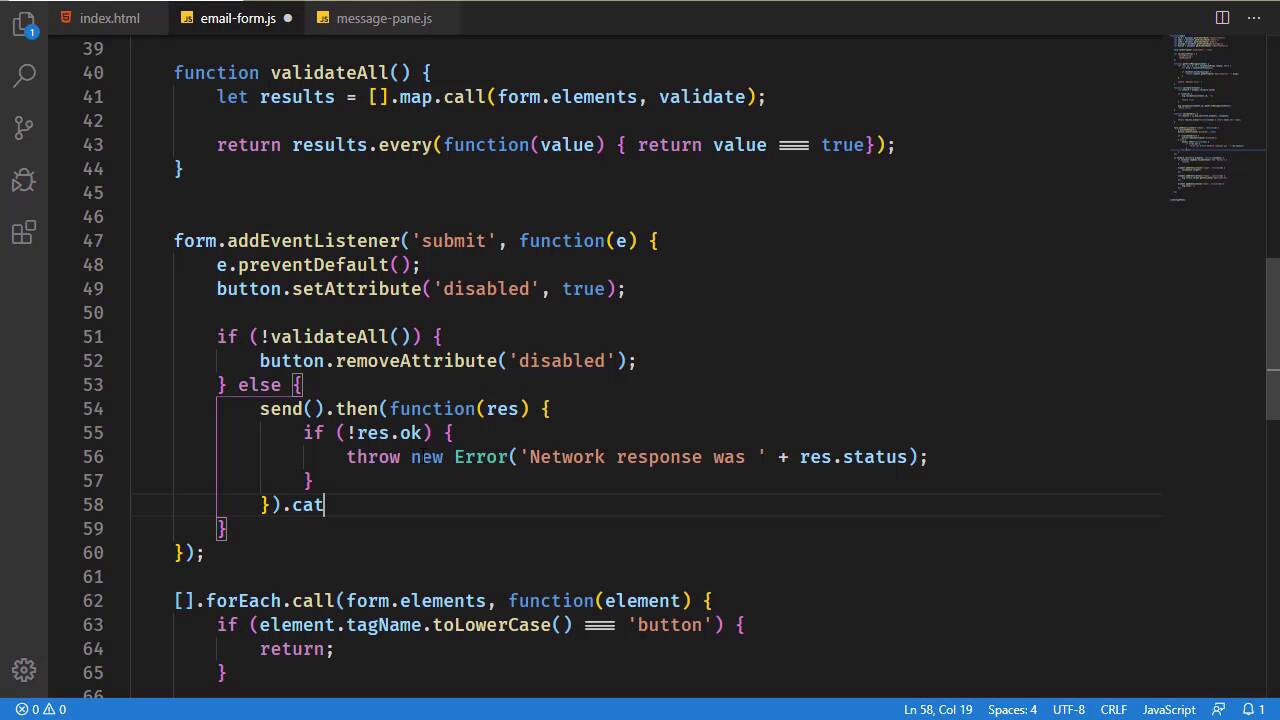
- Overview
- Transcript
2.6 Submitting the Form
The last step in handling a form is submitting the data to the server. In this lesson, we'll use the fetch() API to submit our form's data and output any messages.
1.Introduction
1.1Introduction02:30
1.2Getting Started06:29
2.Building the Form
2.1Writing the Markup08:45
2.2Setting Up Unobtrusive Event Listeners08:44
2.3Organizing Functionality With Objects07:32
2.4Validating Form Fields10:40
2.5Displaying Validation Messages09:42
2.6Submitting the Form11:03
3.Conclusion
3.1Conclusion02:34
2.6 Submitting the Form
We are almost done with our validation code. In fact, the only thing that we need to do is validate the form whenever we click on the Submit button. Now, you could make the argument that we don't really need to do that because we are validating each field individually with their respective input events. And yes, that is true. And really, we could take a variety of different approaches for form validation. There really isn't a wrong way of doing it. For example, we could have started off with the Submit button as disabled, and it would only be enabled when the form is valid. And that would be a great place to where we would rely upon the individual fields for their validation. However, our particular design doesn't lend itself to that. Instead, it means that we need to validate the form before we submit it. And really, it's not that big of a deal because we already have some code ready to go with our validateAll function. All we need to do is implement this function and that's it, we would be good to go as far as validating our form is concerned. So this is the approach that we will take. And, of course, validateAll() needs to return true or false. So here's how we can do this, it just takes two lines of code. The first thing we are going to do is iterate over all of the form fields. And we are going to determine whether or not they are valid. Now, we already have a function for doing that called validate. So what we could do is use the arrays map method, and we would call it just like we called the forEach whenever we set up the event listeners for our form elements. Although in this case, we don't really need to filter out the button because that's not going to be an issue here. So we will iterate over the form elements. And for each item in the elements list, we will call the validate function. That will essentially give us a new array that contains Boolean values. So then all we need to do is check to see if all of those values are true. And we can do that with the every method, and then the function that we supply, this every method will simply test whether or not the value is equal to true. And if every item in results is true, then every returns true. If just one is false, then it's going to return false, thus, giving us whether or not the form is validated. So now, we can go back to the browser, we can click on Submit, and we can see that we just validated the form and we have our validation messages. And of course, if we provide the valid information, those messages go away. So now we just need to do something whenever the form is valid. So let's first of all get rid of this console log because we no longer need that. And we're going to have an else statement here. So basically, if the form is valid, then we, of course, want to send that data to the server. Now, here's the thing about our particular environment. Lite server Isn't really set up to allow us to post data to anything because that is what we would need to do in this particular case. We have contact information that we need to post so that the server application can do whatever it needs to with that information. We can't do that with light server. But we are going to, first of all, write the code using a post request. And then we will go to a get request so that everything works. If any of that doesn't make sense, then the code will. So let's say that we're gonna have a function called simply send, and that's going to send our form information to the server. And we could use several different APIs or libraries to perform the HTTP communication. We are just going to use fetch because it's built in. It's easy enough to use. And we might as well. In a real application, I would probably go to something like axios just because I like that particular library. But fetch is going to work just fine. So this is going to give us a promise that will allow us to use the then callback, which will give us a response. And we need to check what that response is, because the response will tell us whether or not if everything went okay. This callback function is going to execute as long as the browser received something from the server. So a 404, 500, anything like that is going to result in this then callback being called. So we need to check to see if there was anything that went wrong with the request. So the server gives us back something other than an OK response, in which case we would simply throw a new Error. And we would say that there was a network error and we will simply give what that response is. So we will use the response object that has a status property. Now, if we are throwing something that we need to catch, which is another callback. And this catch is used for any type of errors that actually occur with the request itself. So perhaps the computer that the browser is currently running in, went offline, or there was something wrong with the fetch itself, then that's where this catch would come into play. But since we are throwing this exception here, the catch will come into play here as well. And then all we have to do is write that error message to our message pane. So let's say that we will have a method called appError. We will pass in the error, so that we can display that to the user. But then we also need to remove the disabled attribute. Because at this point in time, the form has been submitted, we got an error, so the user will need to resubmit the form and, thus, we will need to remove the disabled attribute. Now, if everything went okay with the request, then we can write just an info message saying, Thank you for your message. And that will let the user know that everything went okay. So let's write this send function. It's going to be very simple in that we will use fetch here. And then we need to specify the URL. Now, we could hard code a URL, but we also have the URL from our form. If we scroll up to the action, there is a URL there, although let's change this to an actual file. And it really doesn't matter what it is. I'll just call it file.html. So this is what the form would normally oost to. So we can grab this URL and use that inside of our send. So let's get the URL. We will use form, we will use the getAttribute method. We want the action attribute. That will give us the URL so that we can then send that with our fetch. And since we're gonna start with a post request, we need to set some options. First of all, we need to set the method, which is going to be POST. We also need to set the Content-Type header because we are going to send this as a JSON structure. So Content-Type is going to be set to application/json. And then finally, we need the request body, which is once again a JSON structure. So we will use JSON.stringify. And then we will get the values of our fields. So we finally get to use those variables that we created a long time ago. I'm glad I didn't remove them. So we have name, email, and then finally message. So we will have these values. And this is going to return a promise, this fetch call. So we need to return that so that we will be able to use them and then catch. So now we just need to implement this appError. And the first thing we need is a container for those error messages. So let's just copy one of these containers that we already have, rename it to error-messages. And we also want to set the alerts to use danger. So that's done. Now, we just need that appError method. And really this is going to work a lot like info, so we can copy the info method. Let's change it to appError and then we need our output element, our container. So let's call that errOutput. And then this is the error-messages ID. So now we just need to replace infoOutput with errOutput. That should be that. Let's give it a try. So, of course, our validation is working. Let's just give some valid information like hello world for the message. And whenever we submit this, we should get an error because we aren't allowed to post here. So we get Network response was 404. That is great. That's what we wanted. Now, let us change our send function. We still want this code. So I'm going to comment this out because that is essentially what we would normally want to do. And instead, we are going to issue a get request. So we don't need to specify the method, the head, or the body, or anything like that. We do, however, need to create that file, which was simply called file.html. So even though we got a 404 beforehand, that's not really why we got a 404. We got a 404 because light server is not allowing us to submit a post request to that file, even if the file already existed. So I just wanted to be clear there. So now, whenever we fill out the form, we supply valid information, and then we submit. We should get a success message. Thank you for your message, because now we are just issuing a get request. Get requests are simple in that file does exist. So voila, we have our success message.


