
 Lessons: 9Length: 40 minutes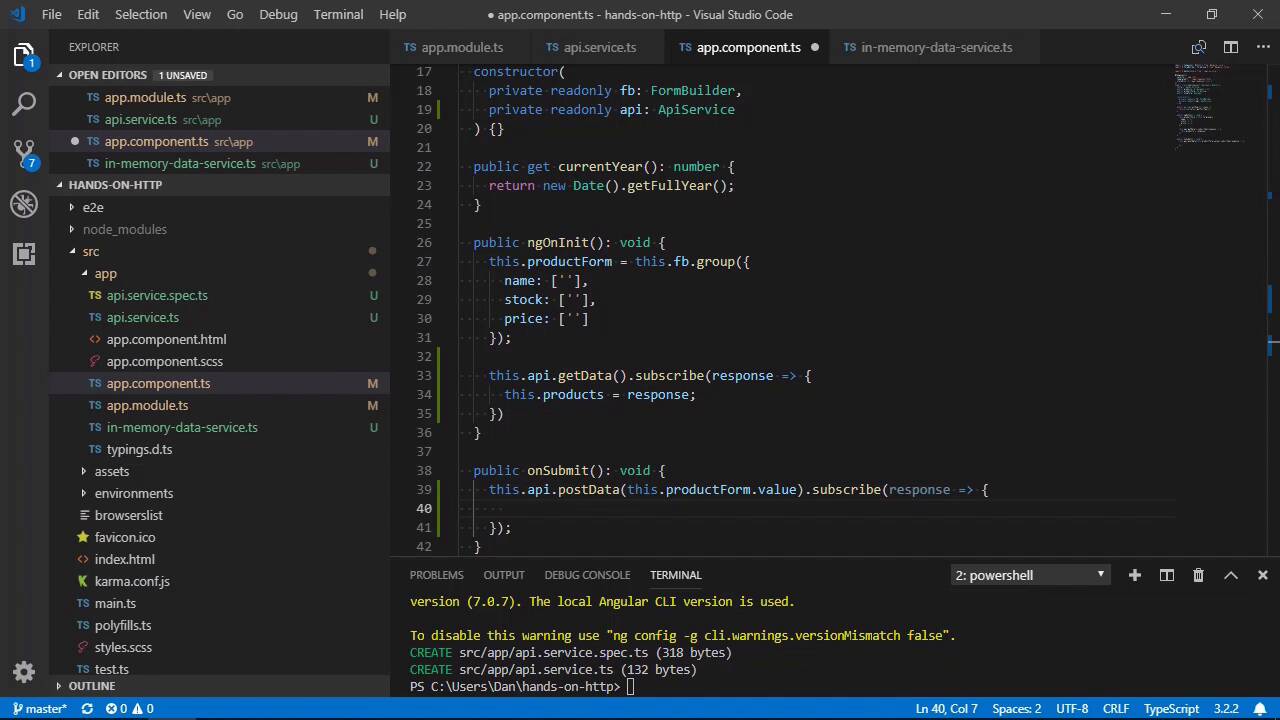
- Overview
- Transcript
2.2 Sending a POST Request
In this lesson you'll see how to make a POST request to send data to the API using Angular's HttpClient module.
1.Introduction
1.1Introduction00:46
1.2Setup04:05
1.3Angular's in-Memory API03:39
2.Making Basic HTTP Requests
2.1Sending a GET Request06:18
2.2Sending a POST Request04:44
2.3Working With Headers06:14
3.Advanced HttpClient Usage
3.1Using Progress Events: Part 107:01
3.2Using Progress Events: Part 206:44
4.Conclusion
4.1Conclusion00:54
2.2 Sending a POST Request
Hi folks. In this lesson we're going to see how we can make a POST request to the server. A POST request is used to send data to the server rather than simply requesting some data. Although GET requests can also send data to the server, using a POST request is recommended for security. The example site already has the facility to add a new product, it just isn't connected to the API yet. So that's what we'll be doing in this lesson. Let's just take a quick look at the example site once again. And there's this link up in the header called Add product. When we click on that, it should show a form that can be used to add a new product to the table. It's not actually wired up yet, so clicking the button does nothing. Let's fix that now. So first of all, let's add a new method to send a POST request to our API service. So this method is called postData and it receives the new product to be sent to the server as an argument. It also returns an observable containing any type. Inside the method, we can return the value of the POST method of Angular's HTTP client. Like the GET method, the POST method also receives the URL to make the request too as the first argument. And it also has a second argument, which is the data that we want to post to the server, in this case, a new object matching the structure of the objects already stored in the in memory DB. This part is important. If the new object doesn't match the structure of existing objects, the in memory DB will not accept it. So now let's use our new method in the app component. There is already an onSubmit method, which is hooked up to the form. And this method will be invoked whenever the Add product form that we saw at the start of this lesson gets submitted. So inside here we can call the new post data method of the API service and pass it the values from the form. The in memory DB will simply echo back to the object that we send to it if it is successfully added, so we can use the response object to update the products array in the component and reset the form. So now lets go back to the browser, And let's try to add a new product. And we can see that the new product does indeed get added to the table. Now there is one downside to using Angular's in memory DB. If we go to the network tab, we can see that there are the usual requests that get made like the font requests, the various files that the Angular CLI has created when building our app. And there's some web socket stuff and some images coming from a plug-in that I've got installed. The one thing that is missing is a POST request to our backend. Unfortunately, when we use the in memory DB, the in memory data service will redirect and intercept any HTTP requests that get made before the browser knows anything about those requests. And so those requests won't be listed in the betwork panel here, and we do lose this aspect of debugging. However, on balance, it's still better to be able to make requests to a fake backend so that we can continue building the front end of the app rather than sitting around doing nothing, and waiting for the back end developers to actually build the APIs before us front end guys actually do anything. So we lose a bit of debugging, but we gain a lot of time. And, at the very worst, if we get any issues when we do integrate with the real back end, at least this aspect of debugging will work again. It's not a huge problem, it's just something to be aware of. So, in this lesson we saw how we can use Angular's HttpClient to send a POST request to the server. We saw that we can use the post () method of the HttpClient to issue a POST request to the server. We specify the URL to make the request to and the data that we want to post to the server and the HTTP client takes care of the rest of it for us. Thanks for watching.


