
 Lessons: 9Length: 40 minutes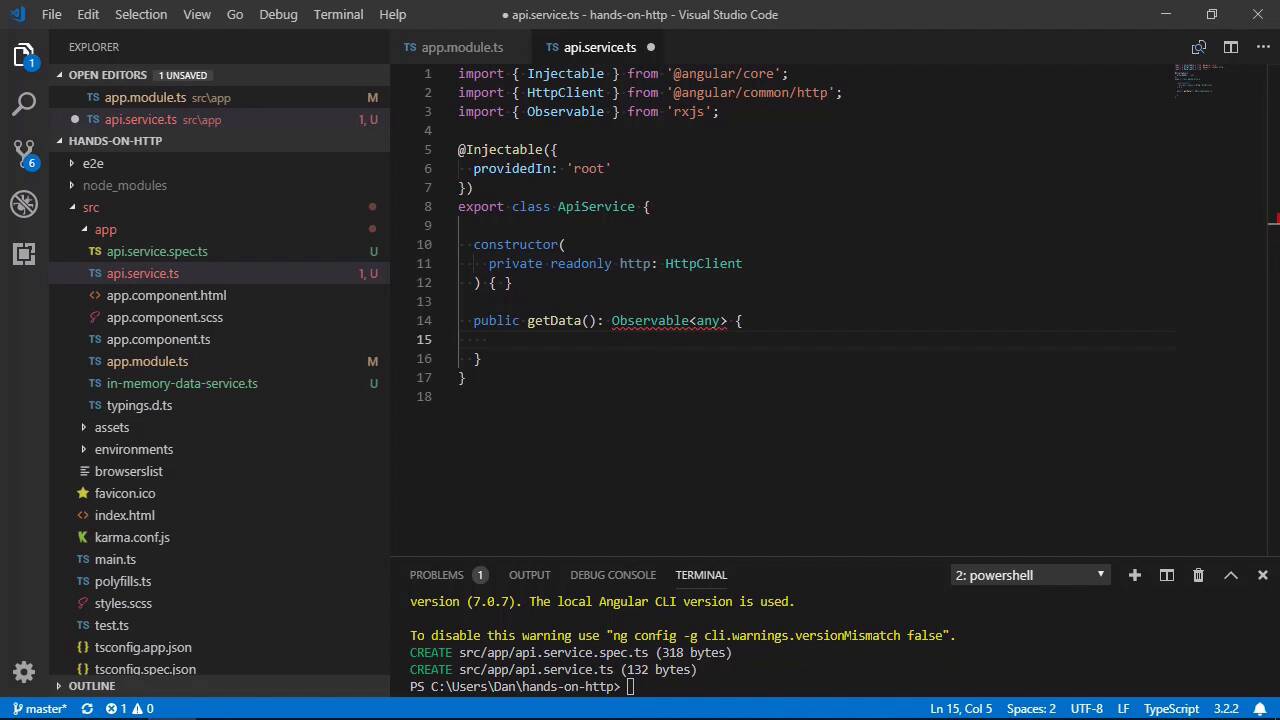
- Overview
- Transcript
2.1 Sending a GET Request
In this lesson you'll see how to make a GET request to get data from an API using Angular's HttpClient module.
1.Introduction
1.1Introduction00:46
1.2Setup04:05
1.3Angular's in-Memory API03:39
2.Making Basic HTTP Requests
2.1Sending a GET Request06:18
2.2Sending a POST Request04:44
2.3Working With Headers06:14
3.Advanced HttpClient Usage
3.1Using Progress Events: Part 107:01
3.2Using Progress Events: Part 206:44
4.Conclusion
4.1Conclusion00:54
2.1 Sending a GET Request
Hi folks, in this lesson, we're going to start by making one of the simplest types of requests that we can make, a GET request. A GET request is typically used to ask for something from the server, usually some data. So let's start out by seeing how we can do that in Angular. The first thing that we need to do, if we want to use any of Angular's HTTP features, is to import the HTTP module from Angular into our application. We can do that in the root app.module.ts file. And, in fact, we have to do it there because it's the only module that we have. Now we can make the module available to our app by adding it to the imports array. Great, now we can make HTTP requests from anywhere in our app. Generally, it's recommended not to make HTTP requests directly from a component or directive. Instead, we should add them to services, which can then be shared between the different components of the app. Let's create a new service, we can use the CLI to do that. The CLI will create two new files for us, the service itself, and a test file for the service. If we open up with the service, we can see that it has added some boilerplate to the file for us which initializes the service as injectable. And specifies that an injector for this service should be created in the root of the app. This means that we'll be able to inject the service into any of our own components. At the top of this file, let's import Angular's HTTP service. Now we can inject this into the constructor as a parameter. Now the HTTP client will be available through the property HTTP throughout this service. And it's this that we need to use to make HTTP requests to backend APIs. As an aside, Angular makes heavy use of observables in many different parts of the framework. And one of those places is HTTP requests, because they're asynchronous. Observables are a little bit like promises, in that they return an object which might return a value at some future point. The main difference is that with observables, instead of a single value being returned at some future point, an observable can return many values. Observables are provided in Angular by a third-party library called RXJS. And all HTTP requests return observables that we can subscribe to. We'll see how to do this shortly, but here and now, we just want to import the observable class into our service. Great, now let's add a new method to the surface called getData. We specify that the method will return an observable containing any value. Inside the method, we can return the return value of Angular's get method of the HTTP client, which will be an observable. The get method takes the URL that we want to make the request to as the first argument. In order for the in-memory API to intercept the request, we need to start this URL with API/. And we then referenced the name of the property in the returned object of the createDB method we added to the in-memory data service in the last lesson. So remember, the object that gets returned here has a key called products, and that's what this part of the request URL references. So now we can use our API surface in another component, like the app component. So first of all, we'll need to import it, And we can then inject it into the constructor. We can keep the property private, as we only want to call some methods. And we can also set it to read only because we won't be changing any of it. For this example, let's just make the get request when the component is initialized. Angular provides the ngOnInit method to allow us to do any setup for the component. And this component already has this method implemented, so we can use that. We'll need to subscribe to the observable returned by the getData method. The getData method returns an observable, and all observables have a method called subscribe. Which we need to invoke in order to make the request actually happen. We can pass a handler function to this method which will be invoked when the request succeeds. The handler will be passed the response from the server. For now, let's just log it to the console. So let's make sure everything is saved and now let's go back to the browser. And let's open up the console, and we can see an array there, let's expand that. And it should contain the three products from the JSON file returned by the in-memory database service. So if we just go up to the top of the file again, we can see that this class has a public property called products, which is an array. And all we need to do is set the response from the server to be this product's array. So let's save that, and when we go back to the browser now, we should find that the table has been updated to show the products that were returned by the in-memory data service. So in this lesson, we saw how to use Angular's HttpClient to make a GET request to the server. We saw that the GET method returns an observable that we need to subscribe to in order to actually make the request. We also saw that we can route requests to the in-memory API by starting the request URL with the name of the API, which in these case is api/, thanks for watching.


