
 Lessons: 8Length: 56 minutes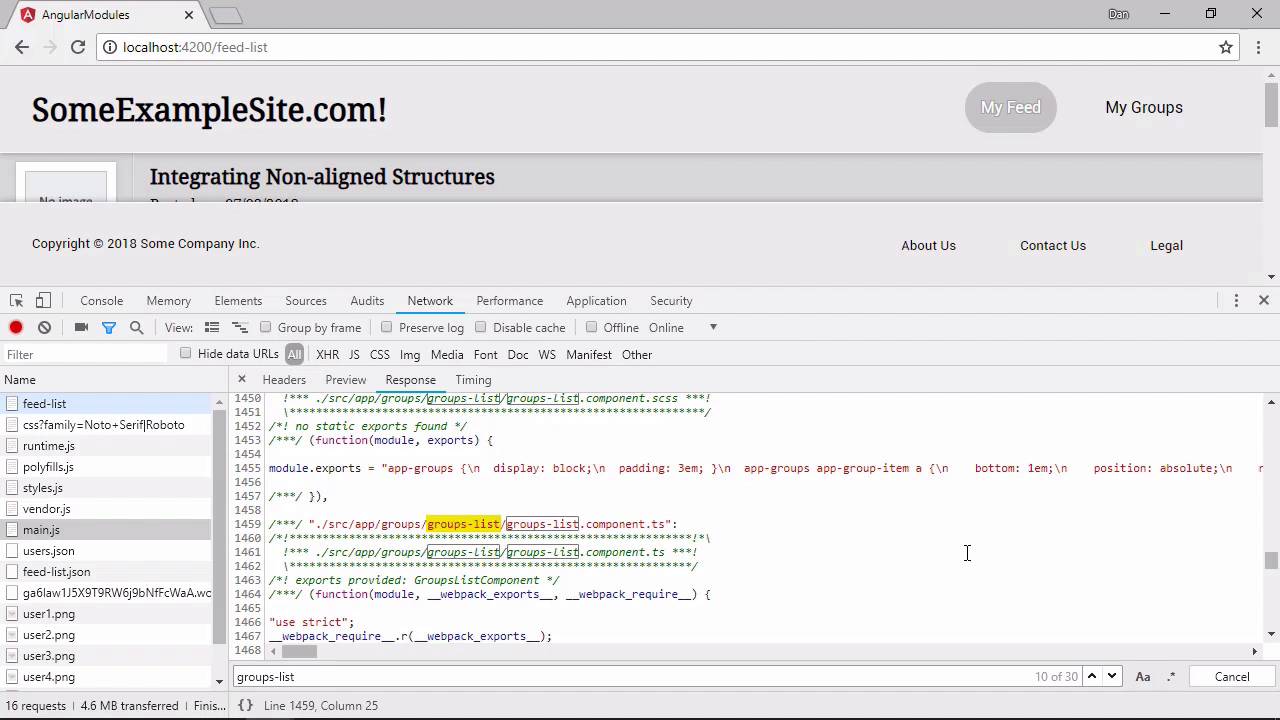
- Overview
- Transcript
2.3 Lazy-Loading Feature Modules
In this lesson, I'll show you how to lazy load feature modules so that modules aren't loaded until your app needs them. This is a logical next step after adding feature modules, and it's a very common requirement in modern web apps.
1.Introduction
1.1Introduction00:48
1.2Setup07:47
2.Refactoring to a Multiple Module Architecture
2.1Adding Our First Submodule05:14
2.2Adding Feature Modules13:30
2.3Lazy-Loading Feature Modules10:36
2.4Handling Services06:51
2.5Creating a Third-Party Module10:22
3.Conclusion
3.1Conclusion00:43
2.3 Lazy-Loading Feature Modules
Hi, folks. In this lesson, we're going to look at lazy-loading feature modules, which means not loading any of the resources for a module until those resources are actually required. At the moment, we've only got one feature module, the feed module which we added in the previous lesson. Let's start by adding another feature module so that we can see the benefits of lazy loading. If you really want to test the knowledge that you've gained so far in the course, why don't you pause the video now and have a go at adding the feature module for the group components, group item and group list. If you don't want to do that, that's fine, just continue watching and you'll see me add the new module. If you do want to do it, great! I'll count you in for the pause, ready? Three, two, one, pause! So how did you get on? Here are the steps that I took. First of all, I used the cli to generate a new module with greeting. I then delete the spec file. We won't need that, and create a new file called groups.component.ts. Inside this file, I import the component decorator from Angular Core, and define a component that has just a router outlet as its template and an exported class. Next, I move the group-item and groups-list folders into the new groups folder. Following that, I then need to update the imports in the groups module. I just want to import the GroupsComponent class in here and add it to the declarations array. I also want to import the GroupsList and GroupItem components. These are already imported in the app module, so we can just cut and paste them from there. I can do the same with the group-item.resolver as well. The components can then be added to the declarations array, and the resolver can be registered as a provider. Don't forget to remove the dead references from the app module. And also in here we want to import our new groups module and add that to the import's array. Now I need to add my new components to the groups-routing.module. I can import the group's related components and resolver here. Next I'm going to build my new routes. The first one is for the groups-list, and I've already got routes for some of these in the main app routes file. So I'll just cut and paste those from there to save time. The groups-list part of each path of the child routes can also be removed. I've just got to update a few paths now and a number of files. These are the group service, groups-list.component, and the group-item files. Lastly, I'm going to reset the ng server and just make sure that everything works as expected. Okay, well, anyway, now that we have two feature modules, we can look at lazy loading. At the moment, even though the app loads with the feed list displayed by default, we're still loading and passing all of the code related to groups. Unless the visitor actually goes to the group's parts of the application, all of this code is useless and simply slows down the initial load. A better way is to lazy load the group's feature module, which means that we only load the code needed for the group's feature when the feature is actually requested by the user. In this case, that would mean hitting the route for either the groups list or an individual group. So let's just take a look at some of the resources that are loaded when we load the application initially. Let's go back to the feed, let's open up the console, and let's just do a hard refresh. So let's open up the Network panel. And we can see all of the different files that get loaded in here. There's the main.js file which contains all of our own code. But there's also the rest of the resources for the page, the JSON files for the mock data, the avatars, or the fake users, etc., etc., fonts and styles and all of the resources that are needed for the whole application. It's the main.js one that's important? Let's take a look at it. We can see that it's currently 109 kilobytes in size. It's not huge, but then the application itself is pretty small. Let's click it to open it. And first of all, let's just see how long the file is in terms of lines of code. We go right down to the bottom, we can see that it's 2,023 lines. And let's just search for something related to groups. And we can see that the groups-list component is in this file, and the styling for the groups-list, and the component file for the groups-list. And that's just going to the feed list. We haven't even been to the group section yet. But all of the code required for the group's part of the application is all loaded into this main.js. So now let's lazy load the feature modules. First of all, we need to remove the feed module and the groups module references from the app.module. Let's just close all of these files. So in the main app module then, we can get rid of the feed module and groups module imports completely. And we can remove them from the imports array as well. The reason why we remove the submodules, the feature modules, from the app module is that if we import them in the traditional way, Angular will greedily load them. And whether or not they're needed, they will just get loaded and included in the main.js file. So instead of importing them in the normal way, we just need to tell Angular about them using special routes. So these can go into the main app-routes file. We specify a path for each module, we can reuse the existing feed-list and groups-list routes. And we specify which module to load using the loadChildren property. The value of this property should be a string composed of the path to the module that we want to lazily load and the name of the class exported by the module. And these two parts of the value are separated using the hash sign. Lastly, we just need to update the routes for the group's component and feed component. And we do this in the group's routing and feed routing modules. And we can now just specify these as empty paths as well. So this should be all we need to do to convert our feature modules into lazily loaded feature modules. Let's see if it worked. We can go back to the application now. Let's just do a hard refresh again. So we're on the feed-list route. That's the default route. And already we can see that main.js is now only 68.4 kilobytes. So it's much, much smaller than it was previously. So don't worry, we haven't lost all of the code, it's just been moved. And as I mentioned, we're in the feed-list route at the moment. And just down underneath main.js, a couple of items below it, there's this new feed-feed-module. And this is where all of the code related to the feed module now resides. So it's been extracted from main.js and it's been put in this special new module script file. And this is a relatively small file, it's 361 lines long. And if were to do a quick search in here for something related to the groups module, we find that there are 0 instances of the word groups. So now let's see what happens when we go to the groups area of the site. We'll just clear the Network tab here. And we can now see that we get this new groups-groups-module. And this contains all of the code related to the groups module. And as you saw, this file wasn't loaded at all until we actually hit one of the group's groups. This confirms that our feature modules are definitely being lazily loaded. And that we are optimizing the application for faster load times at the initial page by only loading the code that we actually need in order to satisfy the immediate request. So in this lesson, we learned how to configure lazy-loading for the feature modules that we added to the application. This is a very common and logical next step after modularizing an application. But fortunately, as we've seen, it requires only very minimal changes to set up. We just need to add routes for the feature modules using the loadChildren property to specify the path of the module and the class name of the module in the format path # ClassName. Thanks for watching.


