
 Lessons: 8Length: 56 minutes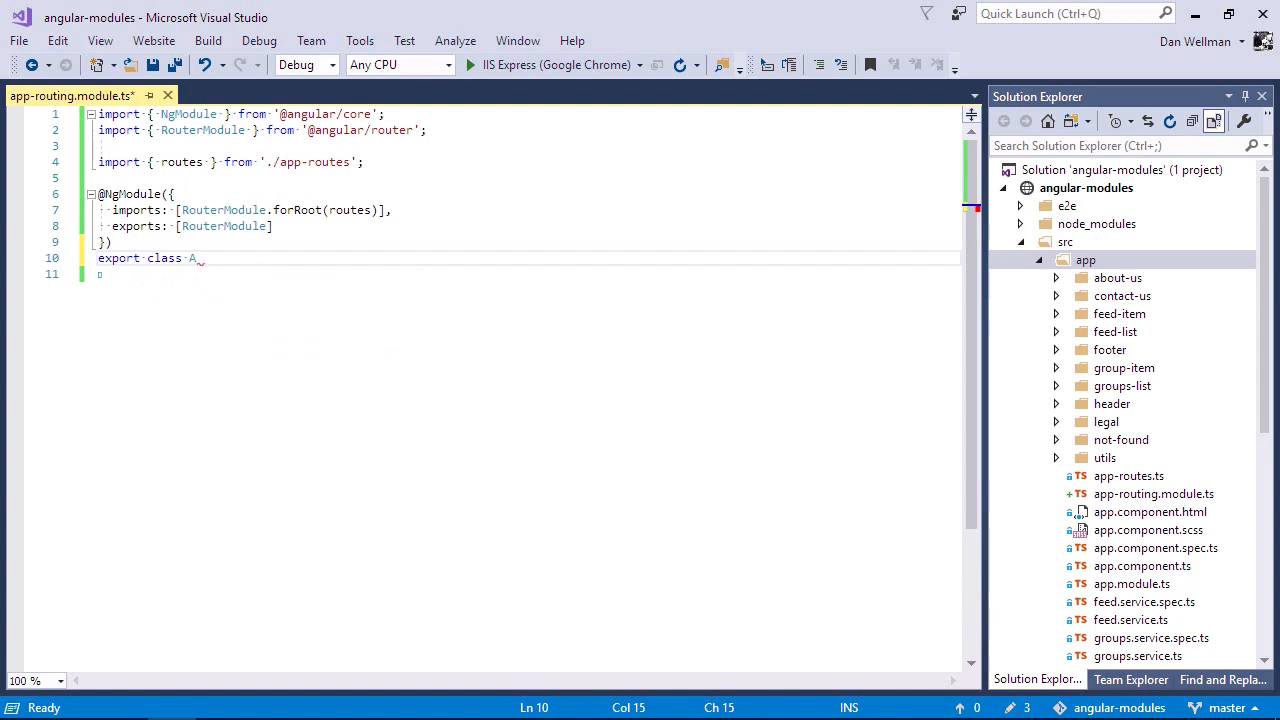
- Overview
- Transcript
2.1 Adding Our First Submodule
In this lesson, I'll show you how to add a simple submodule to an app that contains only a single root module.
1.Introduction
1.1Introduction00:48
1.2Setup07:47
2.Refactoring to a Multiple Module Architecture
2.1Adding Our First Submodule05:14
2.2Adding Feature Modules13:30
2.3Lazy-Loading Feature Modules10:36
2.4Handling Services06:51
2.5Creating a Third-Party Module10:22
3.Conclusion
3.1Conclusion00:43
2.1 Adding Our First Submodule
Hi folks, in this lesson we're going to start refactoring the architecture of the application, turning it from its current single module architecture into a multiple module architecture. The first submodule that we're going to add is a routing module, which will contain all of the routes for the application. This is a very commonly used module. And in fact, you can choose to have the Angular CLI create one when you scaffold out your application initially. This application doesn't have one, however, so that's what we're going to add first. So first of all, then, let's create a new file in the root of the application called app-routing.module.ts. This is going to be a full Angular module, even though it's going to be very small, so we'll need to import the NgModule decorator, first of all. So we're importing this decorator from the Angular call module, Angular itself is highly modular. And all of the functionality is broken down into separate, individual modules that we can import into files where ever they're needed. As this is a routing module, we will also need to import the RouterModule from Angular. We'll also need to import the existing routes for the application, which are already in a separate file called app-routes.ts, and that is in the root app folder as well. So now we can define the module by passing metadata to the NGModule decorator that we imported at the top of the file. So Angular's RouterModule has a static forRoot method which we need to invoke and pass in the routes for our application. The module was also make the routes available to the rest of the app by exporting the RouterModule that we imported originally. Lastly, the module needs to export a class decorated with this module. The class doesn't need any of its own functionality at all. Great, so that should be all we need to do to define our new submodule. So next, we need to make some changes to the root app module. So let's open up the app.module.ts file, which is also in the root of the app folder. So we can see that this file is importing the routes directly, and it's also importing the RouterModule. And if we go down a bit, we can see that the full routes method of the RouterModule is being invoked here in the main app module. So let's remove the RouterModule, we're not gonna need that here. And let's get rid of the routes as well. And let's remove where we invoke the forRoot method. Great, so at this point, if we were to try and run the application, it would be completely broken because it wouldn't know what any of the routes for the application were anymore. So first of all, to get it working again, we need to import the new AppRoutingModule that we just added. And let's add a new section at the top for modules. And let's import our new AppRoutingModule. And then we can add our new module to the imports array. Perfect, so this should bring the application back to life. So let's go back to the browser now and just check that everything is working in the way that it should do. It's looking good so far. Let's just refresh the page, and let's open the console and make sure there's no errors there. It's all looking good. And lets make sure that we can hit one of our subroots. Perfect, so in this lesson we've added a completely new module to the application. It's a very small and simple module, with a single purpose, which is to expose the relatively simple routing for the application. Technically, the app now has a multiple module architecture. Although for us, this is only the first step towards breaking up the application and making it friendlier to further development. We've had a short and gentle introduction to creating and using a submodule in an Angular application. So in the next lesson, let's wrap things up a little and add a feature module. Thanks for watching.


