
 Lessons: 8Length: 56 minutes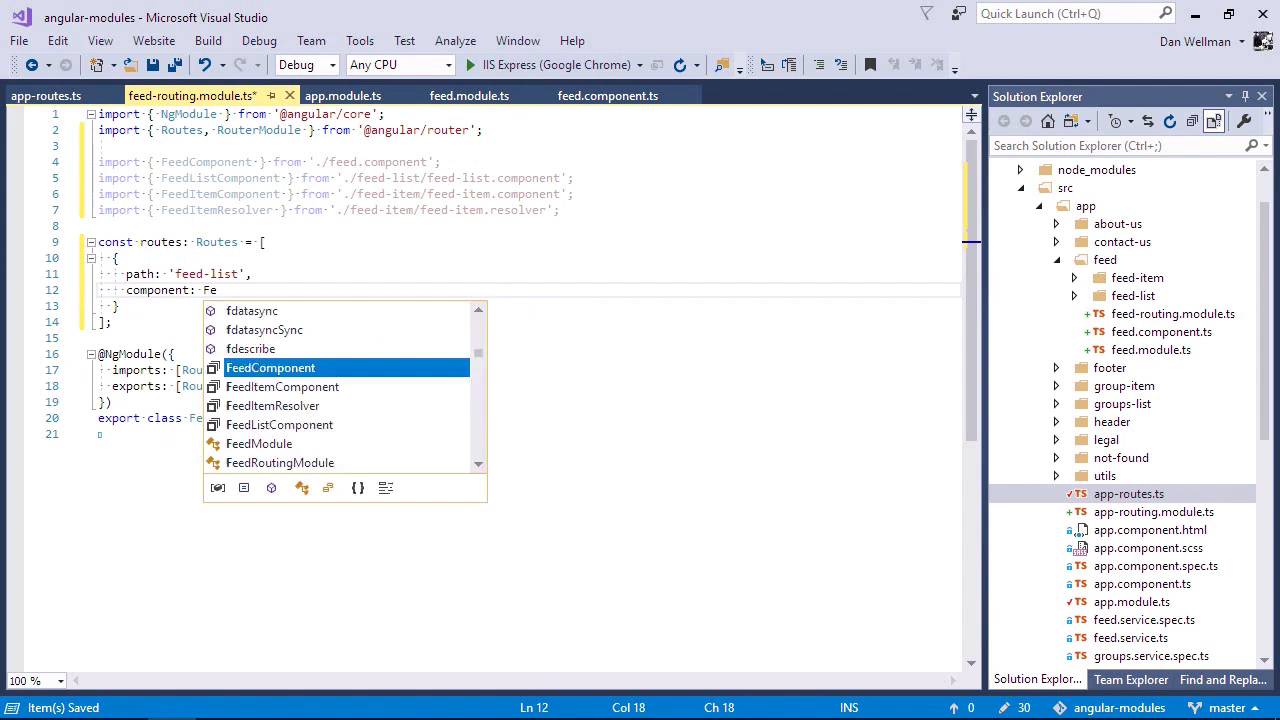
- Overview
- Transcript
2.2 Adding Feature Modules
In this lesson, I'll show you how to add a feature module to the app. This will let us break the app up into functional and organisational units that each map to specific features.
1.Introduction
1.1Introduction00:48
1.2Setup07:47
2.Refactoring to a Multiple Module Architecture
2.1Adding Our First Submodule05:14
2.2Adding Feature Modules13:30
2.3Lazy-Loading Feature Modules10:36
2.4Handling Services06:51
2.5Creating a Third-Party Module10:22
3.Conclusion
3.1Conclusion00:43
2.2 Adding Feature Modules
Hi folks. In this lesson, we are going to continue refactoring the application by breaking it up into feature modules. A feature module is a module that contains all of the resources for a particular feature of the application. Like a shopping basket or an account page. Let's have the Angular CLI generate the new module for us. One of the features of the example application is the feed list. So let's create a feed module. We're using the Angular CLI, so we start with ng, we then specify the generate command because we want to create something. And the thing that we want to create is a module. So we use the module keyword after the generate keyword. We then specify the name of the thing that we'd like to create, which in this case is feed. And we can enable routine because we do want this feature to also contain its own routing. So we should find now that we have this new feed directory and inside here we have a sub module called feed-routing.module. And this will contain the routing for the feed feature module and we also have the feed module itself and a spec file. Now, we don't really need a spec file because the module's not gonna have any of the same functionality at all, so let's just go ahead and delete this. We will also need a new component, a feed component, that will act as a container for the other feed components. Just like the app component acts as a container for the top level application components. We don't need to use the CLI for this one. Let's just create a new file inside the feed directory called feed.component.ts. This is going to be a very basic component. It just needs to import the component director. This will be a very basic component. It just needs to import the component decorator from Angular. We can define the component using only an inline template so it doesn't need any logic or styling. And once again we just need to export the decorated component. Perfect, we'll come back to this in just a moment. So now in order to remake our application, we must first break it. So let's move all of the directories related to the feed into this new feed folder. This means that we need to move the feed item and feed list folders. Doing this won't immediately break the application, because the application is already running in the background, and it has already complied all the individual components into the app. But if we stop and the dev server, it will blow up. We need to make a number of changes to have things work as they did before. So let's start by updating the new feed module. This module will make all of the feed-related components available to the rest of the app. We need to import the feed component that we added earlier. And we'll also need to import the feed item and feed list and feed item resolver imports into the new module. And we should also remove these from the app module. We know which ones to remove because Visual Studio is already telling us that is can't find these items. So now back in the feed module. We can specify the new things that we've imported as declarations, And we can specify the resolver as a provider. So now I need to fix up the routing. First, we need to import the new feed component into the feedrouting.module. And we'll also need to import the new feed components into this module as well. Let's just copy the imports out of the module. And let's go ahead and remove these now from the app-routes file. We'll come back and remove the actual routes in just a moment. So first of all, let's set up a new routes for the feed component inside the routes array in the feed routing module. And now let's come back and move the existing routes for the feed list and feed item from the app routing module into our new feed routing module. We can add these to the children array of the feed component route and we just need to change the path for the feed list to an empty string. So we don't need two routes of feed-list, and now the feed-list route is going to point to the feed component. And if you remember from when we created that back at the start of this lesson, that has a template which contains a route around it. So this feed-list component, as well the the feed-item component, will be loaded into this secondary route rather. And we just need to adjust the path for the feed item component as well. And because it is a child of the feed components, we don't need feed-list at the start of the path for this one either. So we could separate these routes out into their own file like the main app-routes file contains the routes for the application. But because this module was only dealing with a very small number of routes and components I think it's okay to keep them inside the routing module directly like they are here. So if this feed feature were to grow much bigger, we'd probably want to move them out into their own file. But for now, I think let's just leave them as things are right now. So while we've got this file open, I just want to point out one thing. Because these are routes for a sub module rather than the route module, we use a different method of the route module. So instead of passing the route into a method called for route, we instead pass the routes into a method called for child. Because these routes are child routes of the feed module rather than top level routes of the app module. So now there's a couple of issues that we need to fix up in the actual components themselves. In the feed item component, we just need to create some paths. So mostly these just need to move up a level now that we're in a subfolder. And we need to do the same thing in the feed list component. And we just need to update some paths in the feed service now, which is still outside of the feed folder at this point. So these are now inside the feed folder. So at this point we should be able to build the application again. It's displaying an error at the moment, but let's just stop and restart the development server. We probably only saw those warnings because we've been moving files about. So stopping and restarting the server will help with that and it looks like there's a path that hasn't been updated in the feed item interface file. And it looks like everything is working, let's go back to the example application. And we can see that although the application is working, it's currently displaying the 404 page because it doesn't know what the feed list route is. Now we've defined this route in the feed module, but we're not actually doing anything yet with the feed module. So last of all then, we need to bring our new feature module into the main app module by importing it. And now we can add this feed module to the imports array with the other modules. Now we do need to be careful exactly where we add this new module. It must come before the app routing module or none of the feed modules routes will ever be matched. So let's insert it here directly above the AppRoutingModule. So let's go back and check that the application is working exactly as it should now. So we do have a slight issue. It can't find the feed service, and it looks like that's happening inside the feed-item.resolver. And let's just check actually in the feed list as well. That all looks good. Okay, so let's go back to the application again. So we've got an error in the console, so it's giving us a warning about the feed component. And as you can see the application has now come back. So let's just make sure that we can go into one of the feed items. And it looks like that's working as it should. So in this lesson, we added a single feature module to the application which allowed us to move most of our feed related elements into a sub folder. The feed service is still in the route of the application but we'll comeback to that in a later lesson. Let's just review exactly what we did to wire up our feature module. So we added a new module called feed module. This module is imported into the route app module, and it has its own routing submodule. We added a shell component for the feature called feed component. This component contains only a router outlet in the template, and this is imported into the feed module. We moved the routes for the feed components into the feed-routing module and specified that they are child routes of the shell-feed component. So refactoring the feed components to a feature module allows us to logically organize them as a single unit, making the application easier to understand and maintain. Thanks for watching.


