
 Lessons: 17Length: 1.9 hours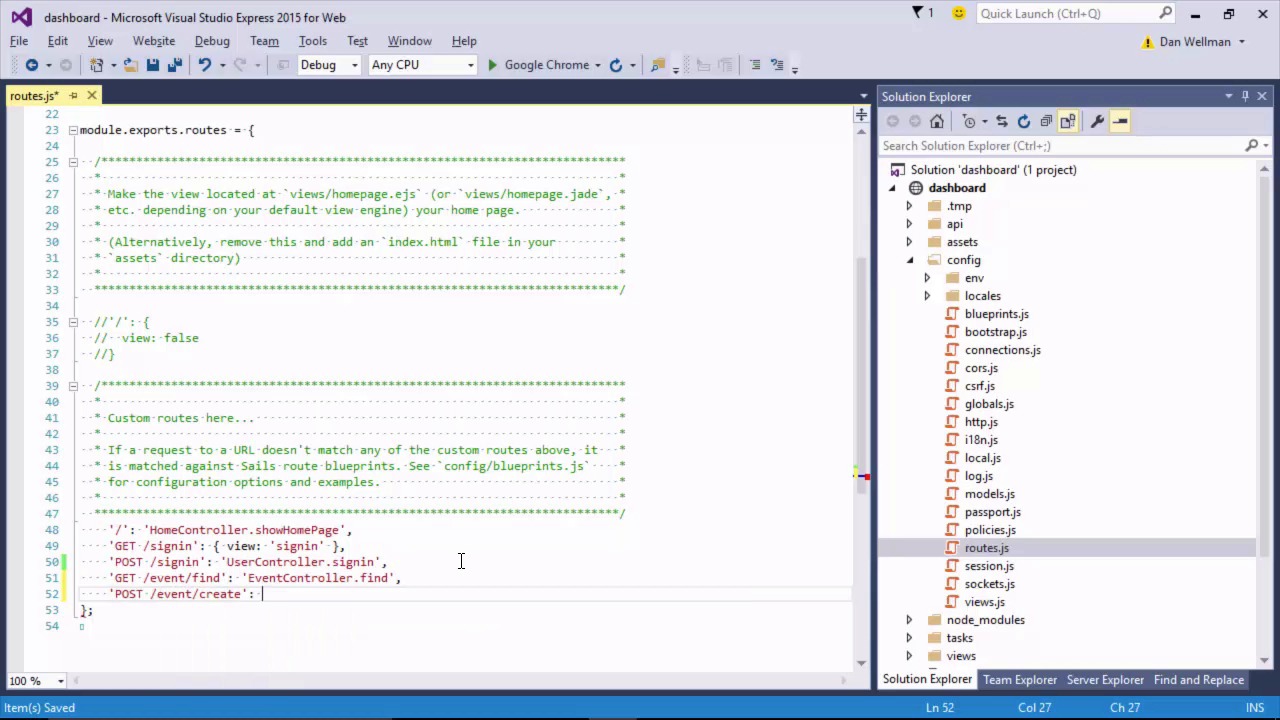
- Overview
- Transcript
5.2 Exposing the Event API
We just need to fix a couple of small issues to finish off our example app. Let's do just that in this lesson to reinforce some of the techniques we've learned.
1.Introduction
1.1Introduction01:26
1.2About Sails.js02:34
1.3Setup07:27
2.Sails.js From the Front-End
2.1Serving Static Assets08:25
2.2Switching From LESS to Sass11:42
3.Sails Blueprints
3.1Shortcut Routes07:40
3.2Restful Routes05:54
4.Building the Back-End
4.1Moving to MongoDB07:12
4.2Working With Models14:58
4.3Working With Controllers06:12
4.4Configuring Middleware10:10
4.5Working With Routes05:47
4.6Rendering Server Views06:09
4.7Policies and Responses08:12
5.Additional Techniques
5.1Hooking Into the Bootstrap Process06:29
5.2Exposing the Event API03:26
6.Conclusion
6.1Conclusion01:28
5.2 Exposing the Event API
Hi folks. In the last lesson we migrated all of our event data to MongoDB. But there's still a couple of things left to fix. First of all if we go through the sign in process and get to the dashboard, it's still empty. Secondly, if we open up Postman and try to request to simulate some of their apps sending telemetry data, we find that Postman gets the login page as a response, and that's not what we want. Let's finish up the course by fixing these two issues. To get the event data displaying on the homepage, we just need to add a route for event/find. We can do this in the routes.js file in the config folder. So that's fixed the graphs for us, so now let's fix Postman. We also need to add a route for event/create. And last of all, we just need to open this action up so that it can be used without authentication. So now in policies.js, which is also in the conflict folder, let's allow the create action to be accessed. Great. So now if we go back to Postman, we should find that we can send new events and receive the 201 response as expected. First we need to relift Sails, of course. So there's a syntax error here, let's just see what this is. Okay, let's try that again. And this time we see the 201 created and the event that we posted is echoed back to us. So in this lesson we reinforced some of the concepts that we've dealt with in previous lessons in order to make the event model usable. We added routes for the actions in the event controller and we opened up the events/create action, so that we can use it from Postman. So we now have a fully working example application built with Sails JS, and this now brings us to the end of the course. Thanks for watching!


