

We often need to use a randomly generated number for certain situations; using Math.random() * n will usually do the trick, but it will only calculate a number from 0 to n. What if we need a number that doesn't give 0 as the minimum value? How can you generate a random number between 100 and 1000? I'll show you how to do it in this Quick Tip.
Final Result
This example demonstrates the function we'll be creating:
Input two numbers separated by a ',' and press the random button.
Step 1: Brief Overview
Using a function created in ActionScript 3, we will calculate a number between two values. These values will be passed as parameters and used with the Math class to generate a random number.
Step 2: Create a New File
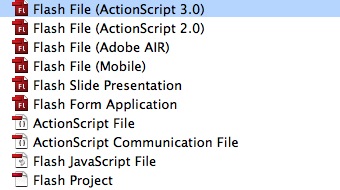
Open Flash and create a new Flash File (ActionScript 3.0).
Step 3: Open the Actions Panel
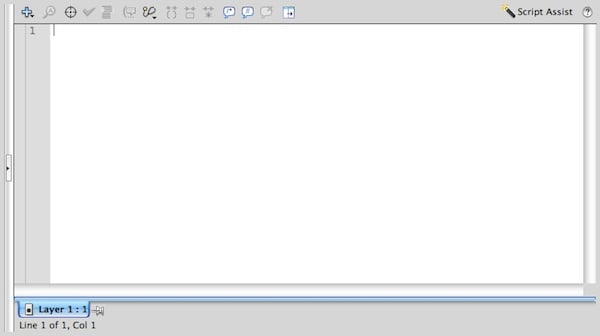
Press Option + F9 or go to Window > Actions to open the Actions Panel.
Step 4: Function Declaration
Declare a Function and name it randomRange; this function will return the random number, so set the return type to Number.
1 |
|
2 |
function randomRange():Number |
3 |
{
|
Step 5: Set Parameters
Two parameters will be used to calculate the number.
- minNum: The minimum value to return
- maxNum: The maximum value to return
1 |
|
2 |
function randomRange(minNum:Number, maxNum:Number):Number |
3 |
{
|
Step 6: Write the Main Function
This is the function with the actual random number generator line. The power of Math is used to generate the number.
1 |
|
2 |
function randomRange(minNum:Number, maxNum:Number):Number |
3 |
{
|
4 |
return (Math.floor(Math.random() * (maxNum - minNum + 1)) + minNum); |
5 |
}
|
Step 7: How it Works
We have our random number generator function, but what does this function do?
Take a look at the following image to get a better idea:
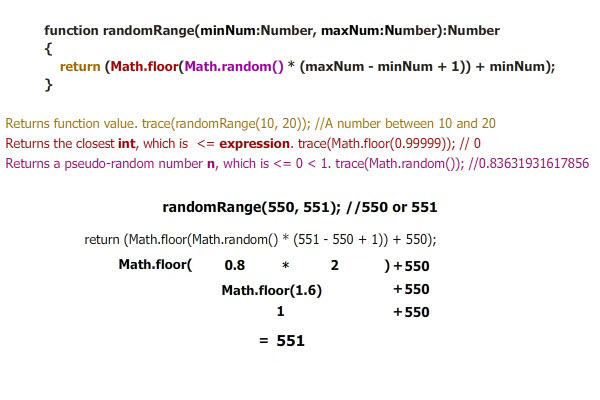
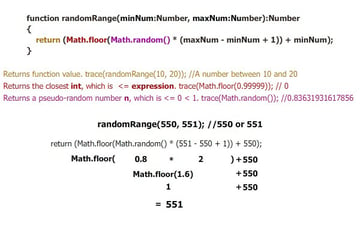
In the image's example, if Math.random() was less than 0.5, the result would be 550.
Step 8: Test with a Trace
A simple way to test the function is to use a trace() function. See the code below:
1 |
function randomRange(minNum:Number, maxNum:Number):Number |
2 |
{
|
3 |
return (Math.floor(Math.random() * (maxNum - minNum + 1)) + minNum); |
4 |
}
|
5 |
|
6 |
trace(randomRange(10, 20)); //A number between 10 and 20 |
Step 9: Example
This is a working example, it uses a button to calculate the number and display it in a TextField.
1 |
|
2 |
/* The randomRange function */
|
3 |
|
4 |
function randomRange(minNum:Number, maxNum:Number):Number |
5 |
{
|
6 |
return (Math.floor(Math.random() * (maxNum - minNum + 1)) + minNum); |
7 |
}
|
8 |
|
9 |
/* The actions that will perform when the button is pressed */
|
10 |
|
11 |
function buttonAction(e:MouseEvent):void |
12 |
{
|
13 |
//An array will store the numbers in the textfield
|
14 |
var n:Array = inputText.text.split(","); |
15 |
|
16 |
//Calculate the number based on the input, convert the result to a string
|
17 |
//and send that string to the textfield
|
18 |
generatedNumber.text = String(randomRange(n[0], n[1])); |
19 |
}
|
20 |
|
21 |
//Add button's event listener
|
22 |
actionButton.addEventListener(MouseEvent.MOUSE_UP, buttonAction); |
Input two numbers separated by a ',' and press the random button.
Conclusion
This is a basic example of how you can use this function; experiment and use it in your own projects!
Thanks for reading!
 By
By






