

- Overview
- Transcript
7.2 Displaying the Pages
Now we need to display our pages' content. In this lesson, we'll dynamically build the routes to our pages so that we can navigate to and display them.
1.Introduction
1.1Introduction01:23
2.Getting Started
2.1Creating the Project05:11
2.2Designing the Page Schema15:49
2.3Setting Up Security16:01
2.4Protecting the Admin Portal09:40
3.Managing Pages
3.1Creating the Page Controller12:35
3.2Displaying the List of Pages09:15
3.3Writing the Create and Edit Views14:01
3.4Storing and Updating Pages16:16
3.5Using Policies to Control Abilities13:12
3.6Adding Navigation to the Portal07:12
4.User Management
4.1Displaying Users and Managing Roles17:27
4.2Status Messages and Other Spit and Polish10:10
5.Managing the Blog
5.1Displaying the Post List11:29
5.2Storing and Updating Posts15:04
5.3Adding a Date/Time Picker10:53
5.4Auto-Slugifying the Title04:25
6.Adding Extras
6.1Ordering and Nesting Pages17:41
6.2Using a Presenter08:26
7.Implementing the Front-End
7.1Setting Up the Navigation13:11
7.2Displaying the Pages03:02
7.3Displaying the Blog14:11
8.Homework Review
8.1Deleting Homework07:11
9.Conclusion
9.1Conclusion01:24
7.2 Displaying the Pages
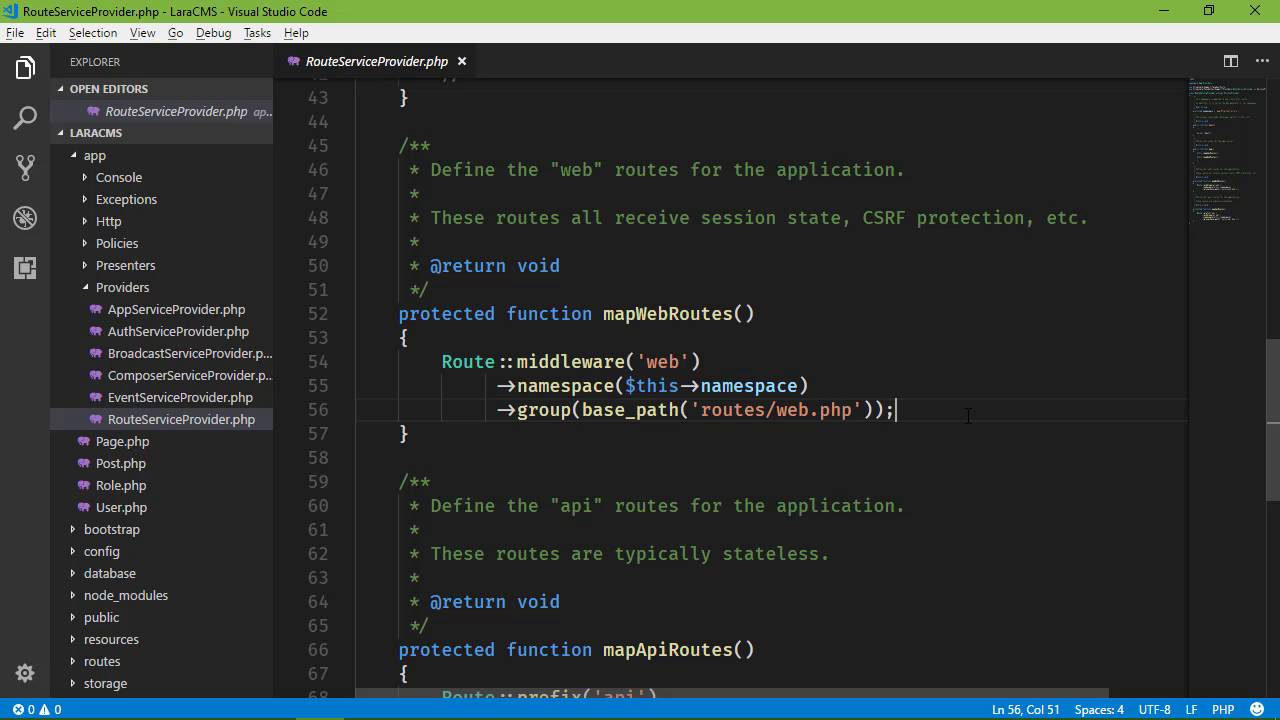
In this lesson, we are going to display the content of our pages whenever we navigate to them. And we're going to start by creating a view. So let's go to resources, views, home. And let's copy index and rename that copy to simply page.blade.php. And inside of this view, let's just display the pages content. So we will use page and then content. And there we go. So now we need to be able to handle the routes. So that whenever we go to any one of these pages like about page that the routes will be handled. We'll pass the appropriate page to the view and then that would be displayed. Now we could approach this in several different ways. One of them would be to create a catch all route so that whatever was provided as the path would then be provided to a controller and an action method but for something like this, we could use something much, much more simple. And that is to create a route for every page that we have. So if we go to our app. And then providers, there's the route service provider. And if you scroll down a little bit, you're going to see the map method. Now you can see that there is map API routes and map web routes. The web routes are what actually loads the web.PHP file. So we can come in here. And we can set up our routes for our pages by looping over them and then creating an individual route for each page. Now when it comes to actually retrieving our pages, it doesn't matter what order that they are in because we aren't really displaying anything by a particular order. All we want are all of our pages. So we will just call the all method. We want each page as a page. And then whenever we set up the routes, well we could do several different things. But we can also say that there's no logic involved. We have all of the information that we need with our page instance here so we could do something like this. We could say route view. The URL is of course going to be whatever our URL property is. Our view is home page. And then we just need to supply the data to our view. And we have that here. So we can just pass that on then. So that's whenever we go to any of our pages be at the contact page we see the content. You can contact us if we go to about, this is about us and if we go to the fact sheet this is another page. So we now have our working pages. It's very simple, but at this point in time, that's really all that we need. Now if we decide that we need to add some more logic to this or if there's some other functionality that we need to provide or then we can start thinking about moving away from just returning a simple view and handling request with a controller but that's later down the line.


